Looking for the best AI voice generator for YouTube? You’re in the right place.
Using an AI voice generator can make a massive difference if you want to enrich your video content with high-quality AI voices and increase your channel’s overall accessibility and engagement.
In this guide you’ll learn which AI voice tools are the most promising and how they’ll take your YouTube productions to the next level. 📈
ElevenLabs 🥇
ElevenLabs provides advanced voice synthesis and cloning in 90+ languages, perfect for diverse digital content creators seeking realistic AI voices and customization.
Speechify
Speechify offers text-to-speech on web, desktop and mobile, plus Speechify Studio for voiceovers, dubbing and AI avatars with 1,000+ voices.

Murf.AI
Murf makes polished voiceovers with 200+ voices in 30+ languages, ideal for content creators working with YouTube, education, or media.
WellSaid Labs
WellSaid Labs focuses on high-quality, customizable AI voice generation for professional-grade voiceovers, supporting brand consistency across your library of digital content.
What Are the Best AI Voice Generators for YouTube?
ElevenLabs is the preferred AI voice generator for YouTube that is unique for its cutting-edge text-to-voice, voice cloning, and wide range of language options.
The 6 best AI voice generators for YouTube right now are:
- 1. Eleven Labs
- 2. Speechify
- 3. Murf AI
- 4. Descript
- 5. WellSaid Labs
- 6. Speechelo
Play.ht used to make this list too, but it shut down after Meta bought PlayAI, the company behind it, in 2025.
Let’s take a closer look at the preferred tools for AI voice generation. 👇
1. Eleven Labs

ElevenLabs AI voice technology is a state-of-the-art tool that leverages deep learning to produce highly realistic and customizable AI voices for your YouTube videos.
It’s designed for content creators who want to implement AI voices and voice synthesis for video content, games, audiobooks, and AI chatbots.
ElevenLabs’ advanced synthetic voice tech is widely regarded by AI enthusiasts and creators as the best AI voice generator and cloning tool on the market.
I took a deep dive into the range of capabilities in this detailed ElevenLabs’ review.
Key Features
-
Extensive Language Support: Eleven v3 covers 70+ languages and the newer Eleven v4 covers 90+, with a huge range of accents.
-
Voice Cloning: Clone your own voice (or anyone’s, with their permission) from a minute or two of audio and tweak it to your heart’s content, making your projects as unique as you are.
-
Voice Customization: Adjust speed, stability and style, or direct the delivery with audio tags like [whispers] and [laughs]. It’s like having a world class studio in your browser.
-
Cloud-Based Storage: Save your projects in the cloud and hop back in from anywhere, anytime.
-
Customer Support: ElevenLabs feature detailed FAQs and resources for troubleshooting and learning how to use the platform more effectively.
Pricing
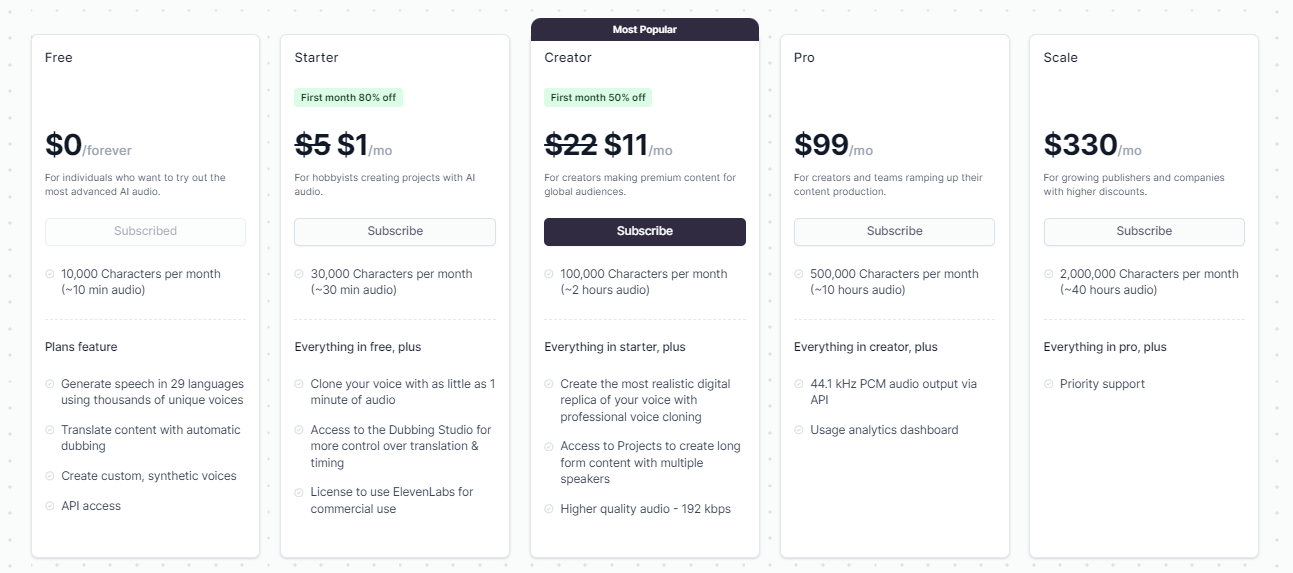
The plans in this screenshot have changed. Here’s what ElevenLabs charges now:
-
Free: 10,000 credits a month (about 10 minutes of speech), but no commercial license, so it’s for testing rather than monetized videos.
-
Starter: $6 a month for 30,000 credits (about 30 minutes of speech), instant voice cloning and a commercial license. It’s an excellent way to get started.
-
Creator: $22 a month (first month half price) for 121,000 credits (about 2 hours of speech) and Professional Voice Cloning.
-
Pro, Scale and Business: $99, $299 and $990 a month for 600,000 to 6 million credits, aimed at full-time creators and teams. Enterprise pricing is custom.
Benefits
-
High-Quality Voice Output: The voices are so lifelike, you’ll swear they’re human.
-
Versatility: Perfect for any platform from YouTube to TikTok.
-
Ease of Use: The user-friendly interface means you don’t need to be a tech wizard to get amazing results.
-
Data Security: Committed to ethical AI use, implementing safeguards to minimize the risk of misuse and protect user data.
Drawbacks
- Learning Curve: With great power comes a bit of a learning curve, especially if you’re new to advanced AI and audio tools.
ElevenLabs 🥇
✅ Creators choice across the internet for AI text-to-speech
✅ Clone your own voice from a minute or two of audio
✅ Perfect for Instagram, YouTube, and TikTok videos
✅ Free plan to test with, and paid plans from $6 a month
2. Speechify

Speechify is a popular AI voice generator that converts text into speech across multiple platforms, including Chrome, iOS, Android, Mac and Windows.
For YouTube, the part you want is Speechify Studio, a separate subscription for voiceovers, dubbing and AI avatars. It’s especially helpful for YouTube creators who are looking to streamline their content creation process with any of its 1,000+ AI voices.
Speechify’s user-friendly interface and robust functionality support a wide range of applications, from enhancing YouTube videos with natural voiceovers to aiding students in their studies.
Key Features
-
1,000+ Voices: Speechify Studio has over 1,000 lifelike voices across 60+ languages, with control over pitch, pace and pronunciation.
-
AI Dubbing: Dub a video into another language and match the original speaker’s voice, intonation and speed.
-
AI Avatars: Add an AI presenter to your video from hundreds of pre-made avatars, or create your own.
-
Data Security: Speechify says Studio is SOC 2 compliant and that you own everything you create.
Pricing
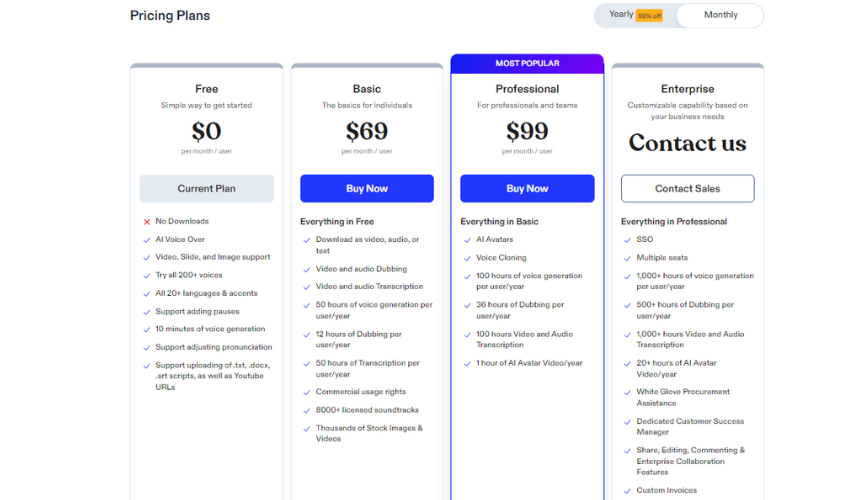
Speechify Studio’s plans have changed since this screenshot:
-
Free: Just getting started? You get 600 Studio credits (about 10 minutes of voiceover) and all 1,000+ voices, but no commercial rights.
-
Studio Starter: $100 a year for 86,400 credits (about 24 hours of voiceover), commercial rights, stock media and AI dubbing.
-
Studio Creator: $300 a year for 345,600 credits (about 96 hours of voiceover).
Voiceovers use 1 credit per second of audio, dubbing uses 3 and avatars use 30.
Benefits
-
Accessibility Features: Great tool for those with reading difficulties, allowing them to listen to written content effortlessly.
-
Multiple Device Support: Ensures users can access the service from anywhere, whether on a desktop or mobile device.
-
Natural-Sounding Voices: Uses advanced technology to produce fluid and clear voices that mimic human speech closely.
-
Scalability: The platform’s multilingual capabilities and cross-platform availability support scaling as user needs grow.
-
Customer Support: Provides extensive user support with a responsive customer service team and a comprehensive help center.
Drawbacks
- Limited Functionality: Although Speechify provides high-quality voice outputs, its 60+ languages trail ElevenLabs’ 90+, and Studio doesn’t advertise voice cloning. If you want to narrate in your own AI voice, ElevenLabs or Descript is a better fit.
3. Murf AI

Murf is an advanced AI voice generator that provides realistic and customizable voice solutions for a variety of content creators, including YouTubers, educators, and corporate professionals.
It offers a diverse range of 200+ lifelike voices in 30+ languages and accents, making it ideal for anyone looking to produce high-quality voiceovers for videos, podcasts, eLearning modules, or virtual assistants.
MurfAI is often praised for its exceptional sound quality and natural sounding voices, highlighting its effectiveness in enhancing user engagement in eLearning environments.
Key Features
-
Extensive Voice Library: Offers 200+ distinct voices across 30+ languages and accents, with unlimited styles and tones on paid plans. This isn’t just about quantity; each voice is fine-tuned for exceptional clarity and realism.
-
Voice Cloning (Enterprise): Custom voice clones are an Enterprise add-on, so most solo creators will stick to the stock voices.
-
Seamless Media Integration: With Murf Studio, integrate audio seamlessly with your videos, music, or images, streamlining your production process. There’s also a Canva integration on every paid plan.
-
API Access: For tech enthusiasts and developers, the Murf API is a separate pay-as-you-go service from $0.01 per 1,000 characters, with $10 of free credit every month to test it.
Pricing
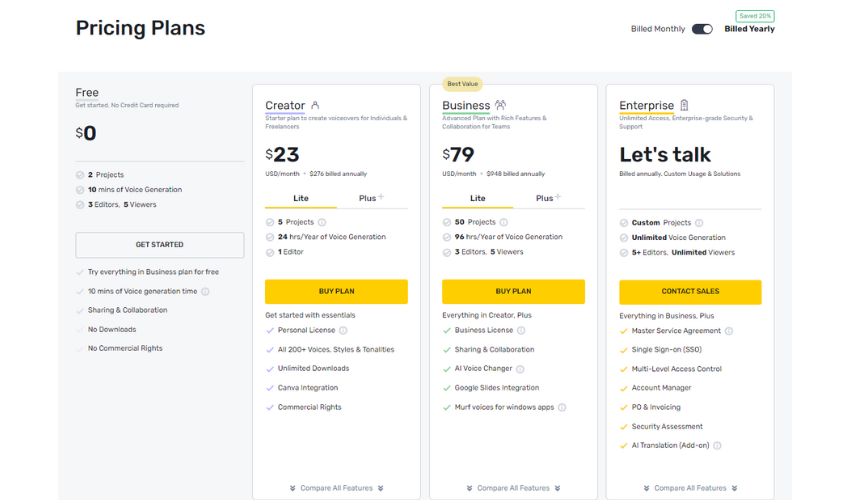
Murf’s prices have changed since this screenshot:
-
Free: 10 minutes of voice generation to explore the platform, but no downloads or commercial rights.
-
Creator Plan: $29 a month ($19 a month billed yearly) for 2 hours of voice generation a month, all 200+ voices and commercial rights.
-
Business Plan: $99 a month ($66 a month billed yearly) for 8 hours a month, a business license and extras like emphasis controls and PowerPoint integration.
-
Enterprise Plan: Custom pricing with unlimited voice generation, team collaboration and custom voice clones as an add-on.
Benefits
-
Excellent Audio Quality: AI voices are engineered to sound natural and engaging, nearly indistinguishable from human speech.
-
User-Friendly Interface: Whether you’re a tech newbie or a pro, the platform is designed for ease of use without compromising on advanced capabilities.
-
Customer Support: User testimonials praise the effective customer support and the platform’s ease of use for creators of all skill levels.
Drawbacks
- Limited Free Version: The free version offers a glimpse but restricts the fuller capabilities which are unlocked in paid plans. You can’t download anything until you pay.
4. Descript
Descript is a video and podcast editor that lets you edit by editing the transcript, like a doc. Its AI Speech feature turns text into speech with stock AI voices or a custom clone of your own voice, which is handy for fixing a flubbed line without re-recording.
It’s built for creators who record and edit their own videos, so it makes a lot of sense for YouTube.
Key Features
-
Text-Based Editing: Edit your video by editing the transcript.
-
AI Speech and Voice Clones: Generate speech from text with stock AI voices, or create an AI version of your own voice.
-
Regenerate: Repair audio and regenerate words so they match the surrounding speech.
-
Underlord: An AI co-editor that handles jobs like removing filler words and cutting clips.
-
Dubbing: Translate and dub video into 30+ languages on the Business plan.
Pricing
-
Free: $0 with 1 media hour a month to try the editor.
-
Hobbyist: $24 a month ($16 a month billed yearly) for 10 media hours, 400 AI credits, watermark-free 1080p exports and AI Speech with custom voice clones.
-
Creator: $35 a month ($24 billed yearly) for 30 media hours, 800 AI credits and 4K exports.
-
Business: $65 a month ($50 billed yearly) for 40 media hours, 1,500 AI credits and dubbing.
Benefits
-
All in One Place: Record, edit, caption and voice your video without bouncing between apps.
-
Fix Mistakes Fast: Type a correction and Descript regenerates the line in your voice.
Drawbacks
- Not a Pure Voice Generator: If all you need is narration, a dedicated voice generator like ElevenLabs gives you more voices and languages for less money. Media hours and AI credits also cap how much you can do each month.
5. WellSaid Labs

WellSaid Labs is an enterprise-level AI voice generator known for producing professional voiceovers with exceptionally high quality.
It is designed for businesses, content creators, and educational institutions that demand the highest standards in audio production for their digital content.
WellSaid Labs is trusted by major global brands for its reliable and lifelike voice outputs, making it an excellent choice for anyone looking to enhance their digital experiences with rich, natural-sounding audio.
Key Features
-
High-Quality Voice Generation: Provides some of the most realistic AI voices available on the market, with 280+ voices modeled on licensed recordings from real voice actors.
-
Extensive Customization: You’ll be able to control tone, pitch, and emphasis, allowing for precise adjustments to meet specific audio needs.
-
Diverse Voice Avatars: From the soothing accents of Irish English to the distinct tones of South African English, choose from a wide array of voices that suit any context or audience. Non-English voices are only on the Enterprise plan.
-
Adobe Integrations: Pro plugs into Adobe Express, and Business adds Adobe Premiere Pro.
Pricing
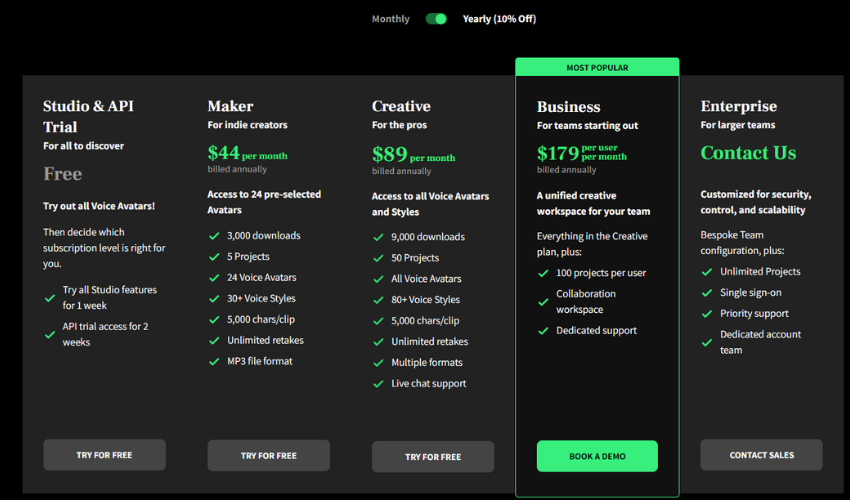
WellSaid’s plans have changed since this screenshot:
-
Trial Access: Free, with 3 download minutes a month and no commercial rights.
-
Starter: $19 a month ($10 a month billed yearly) for 20 download minutes a month, unlimited generation, all English voices and commercial rights.
-
Pro: $49 a month ($33 a month billed yearly) for 180 download minutes a month and up to 48 kHz audio.
-
Business and Enterprise: Business is $160 per user a month, billed yearly, for teams. Enterprise adds all languages and custom pricing.
Benefits
-
Engagement and Clarity: Keep your listeners hooked with voiceovers that are not only clear but also engaging, enhancing the overall impact of your message.
-
Rapid Content Production: Accelerate your production timelines with voice generation that’s far faster than booking and recording a voice actor.
-
Brand Consistency: Ensure your brand sounds the same high quality, no matter the project or platform, with consistent voice delivery that aligns with your identity.
Drawbacks
- English Only Below Enterprise: Starter and Pro only include English voices, so multilingual channels will need Enterprise or another tool. Download minutes also cap how much finished audio you can export each month.
6. Speechelo

Speechelo is an innovative AI voice generator designed to convert any text into a human-sounding voiceover with just a few clicks.
It’s aimed at users who require quick and efficient voiceover solutions for videos, including sales, educational, and training content.
With its promise of delivering near-human quality, Speechelo is suited for content creators, marketers, and educators who do not have access to professional voiceover artists.
Key Features
-
Human-like Voice Quality: Speechelo prides itself on producing voiceovers that really sound human.
-
Multiple Languages and Voices: With 30+ voices in English and 23 other languages, Speechelo caters to a global audience and a variety of content needs.
-
Emotion and Tone Adjustment: This is a cool feature – you can tweak the emotion and tone of the voice to match the vibe of your content, choosing from normal, joyful, or serious tones, and add breathing sounds and longer pauses.
-
Works With Any Editor: Export your voiceover and drop it into Camtasia, Premiere, iMovie or Audacity.
Pricing
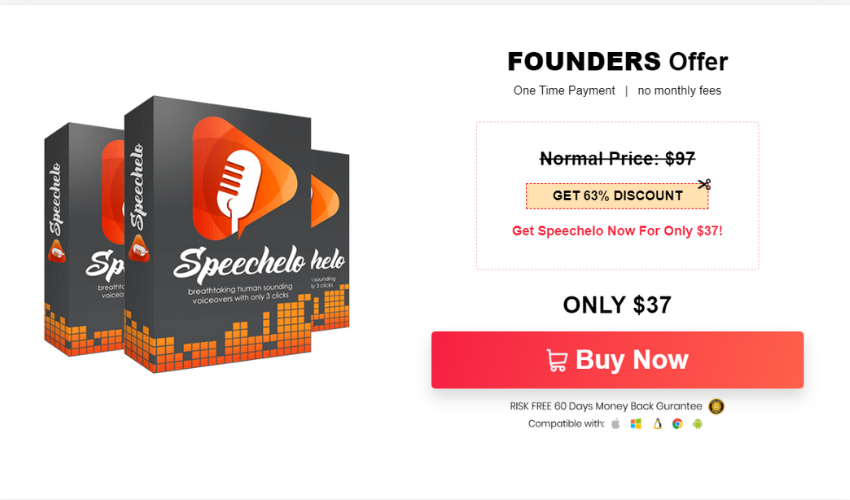
- One-Time Purchase: $47 (the site lists a normal price of $97), with no monthly fees. Heads up: the standard version caps each voiceover at 700 words, and the commercial license comes with the optional Pro upgrade.
Benefits
-
Ease of Use: The platform’s simplicity is a huge plus—just a three-step process to go from text to speech, making it accessible even for those without any technical background.
-
Cost-Effective: By eliminating the need for expensive voiceover services, Speechelo makes professional-quality audio accessible to individual creators and small businesses on a budget.
Drawbacks
While the voices are highly realistic, some users report a slight synthetic undertone, which might slightly impact the perceived authenticity in settings where voice nuance is critical.
Choosing the Right AI Voice Generator for Your YouTube Channel
AI voice generators can streamline your YouTube content creation process, but with so much choice, choosing the right one can be tricky.
Here’s what you should consider when choosing between AI voice generators:
-
Content Type and Purpose: Consider the type of YouTube videos you are creating. Are they educational, entertainment, or promotional? Different AI voice generators specialize in various tones and styles, so choose one that best aligns with your content’s purpose.
-
Voice Realism and Quality: High-quality, natural-sounding AI voices are crucial for maintaining viewer engagement. Listen to samples from different text to speech software to find the best AI voice that sounds realistic and suits your YouTube channel’s brand.
-
Ease of Use: Look for AI voice generation tools that are user-friendly and don’t require extensive technical know-how. This will allow you to easily create voiceovers and integrate them into your videos without a steep learning curve.
-
Language and Accent Options: Depending on your audience, you might need AI voices in multiple languages or accents. Check if the AI voice generator supports the languages and accents relevant to your YouTube audience.
-
Price: Compare pricing plans among various AI voice generators. Consider not only the costs but also the features each plan offers, such as access to different voices, voice cloning capabilities, and any additional tools that may benefit your YouTube video production. Check that your plan includes commercial rights before you monetize.
-
Customization Features: The ability to customize voices (pitch, pace, emphasis) can greatly enhance your videos. Assess if you can tweak the AI voices to match the specific emotional tone or pace needed in your YouTube videos.
-
Voice Cloning Options: If you want a unique voice identity or need to preserve your own voice in your videos without constantly recording new audio, look for AI voice generation tools that offer voice cloning.
-
Ethical Considerations and Data Security: Ensure that the AI voice generator complies with ethical standards in AI use and offers solid data security measures, especially if you plan to use voice cloning features.
-
Support and Resources: Good customer support and accessible learning resources can be invaluable, especially when you are starting out or when you encounter issues. Check if the AI voice generator provides ample support and instructional materials.
Can I Use AI-Generated Voice for YouTube Videos?
Totally! AI-generated voices are the ideal option for YouTube videos because they are versatile and affordable compared to conventional voice-over methods.
These tools can enhance your content by providing diverse and high-quality vocal tones, opening many creative options to align the tone with video themes and the target audience.
For example, AI voice generators can alter their tone to match the emotional content of your videos, whether they’re lighthearted tutorials or intense drama series.
Additionally, AI voice generators streamline the content creation process, enabling faster production with consistent audio quality. This allows YouTubers to focus more on content strategy and less on recording and editing audio logistics. Pair your voiceover with a solid script from one of these AI script generators and captions from an AI caption generator and you’re most of the way there.
There are two YouTube rules to know, though:
-
Disclosure: You have to label realistic altered or synthetic content, like a video that makes a real person appear to say something they didn’t. Using a clone of your own voice for voiceovers doesn’t need a label.
-
Monetization: YouTube’s monetization policies rule out inauthentic content, meaning mass-produced, repetitive videos. An AI voice reading templated scripts on repeat won’t get paid, but original videos that happen to use an AI voice can still qualify.
Wrapping Up
Finding the best AI voice generator for YouTube could be your secret weapon to 10x your content creation throughput.
AI voice generators offer a library of lifelike voices that seamlessly integrate with editing software. You can tailor the tone to any theme, from tutorials to documentaries.
Overall, ElevenLabs outperforms everyone else due to its high quality AI voices, relative ease of use, and affordability.
Give the free plan a go today to unlock your YouTube channel’s full potential!