When choosing the right AI image generation tool for your needs, consider these factors:
- Image Quality: How good is the image output? Is it high quality?
- Generative Fill Capabilities: How well does the tool handle adding or removing elements from images?
- Customization: Are you able to modify various parameters to get exactly what you want?
- User Interface: Is the software easy to use? How long does it take to learn?
- Cost: Does the pricing align with your budget and usage needs?
These were the main considerations I took when determining the best Adobe Firefly alternatives!
Why Use An Adobe Firefly Alternative?
Even though Adobe Firefly is one of the top AI image generation tools on the market, there's a number of reasons creators are looking to use different tools to create images.
Quality
This is perhaps the most common reason creators are looking to move away from Adobe Firefly. When I tested them, I found options like Midjourney, Leonardo, and Dall-E 3 much better at creating images. With Midjourney's Vary (Region) and Editor tools, there isn't much reason to choose Firefly when it comes to quality. To be fair, Firefly now includes partner models like Google's Nano Banana and OpenAI's GPT Image too, which narrows the gap.
Accessibility
To use Adobe Firefly you must first sign up and create an account with Adobe. Although it's not a huge hassle, it can put off new users who might just be looking to try out the tool and see if they like it.
Variety
Unlike most of its competitors, Adobe trains its own Firefly models only on licensed and public domain content. While this is great for users who might be worried about copyright implications, it has resulted in the overall variety of the output lacking quite a bit compared to its competitors. There is also quite a heavy content filter on the images produced with Firefly, so prompts requesting images of celebrities and other potentially controversial topics do not work.
What is Adobe Firefly?
Adobe Firefly is a generative AI tool released in 2023 that can create custom images from a natural language input, alongside a range of other automated image generation features.
These days it's a full creative app for images, video and audio. Adobe's own Firefly Image 5 model sits alongside partner models from Google, OpenAI, Black Forest Labs (FLUX), Runway and others, and it works on the web and as a mobile app for iOS and Android (Adobe).
Upon launch, Firefly attracted attention for its generative fill functionality which allowed users to insert, modify, and remove items from images with simple text prompts.
Firefly Generative Fill (GIF: Adobe)
Firefly has all the features we've come to love from AI image generation tools: text-to-image, Generative Fill, Generative Expand for extending an image, and Prompt to Edit, which changes an image from a written instruction.
Early on, Firefly also had text effects, which was handy because most AI generated images back then struggled with lettering and correct spelling.
Firefly Image Extension (GIF: Adobe)
Adobe has built Firefly with ethical considerations in mind, and it pays Adobe Stock contributors whose content was used to train its models (Adobe).
Adobe's own Firefly models are trained on licensed content like Adobe Stock plus public domain images rather than content scraped from the web, and Adobe designed them to be commercially safe. Enterprise customers even get IP indemnification. This is a massive selling point for companies looking to avoid legal issues associated with AI image generation. Just note that the partner models inside Firefly aren't covered by the same promise, and Adobe leaves it up to you to decide whether they suit your project.
The addition of Firefly into Photoshop is a game changer for users allowing massive time savings and making the barrier to entry for using Photoshop much, much lower. Photoshop's Generative Fill even lets you pick partner models like Google's Nano Banana Pro and FLUX.2 pro on desktop (Adobe).
Key Features
- Generative Fill: Adobe Firefly introduced generative fill, allowing you to seamlessly insert, remove, or modify items in an image based on text prompts.
- Partner Models: Pick Adobe's Firefly Image 5 or partner models from Google, OpenAI and others, all in one app.
- Commercially Safe: Adobe's own models are trained on licensed and public domain content, and Adobe Stock contributors are paid for their part.
Pricing
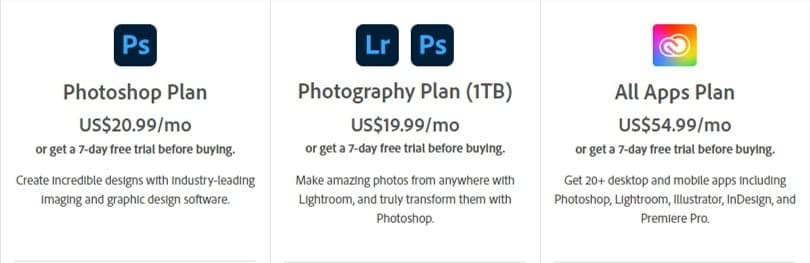
Adobe's plans and prices have changed since I took this screenshot.
- You can use Firefly for FREE in your web browser by creating an account here. The free plan includes a daily allowance of image, video and audio generations.
- Paid Firefly plans (Standard, Pro, Pro Plus and Premium) come with 2,000 to 50,000 generative credits a month, unlimited standard image features like Generative Fill, and access to partner models.
- Firefly also powers Generative Fill in Adobe Photoshop, and every Photoshop plan includes some monthly generative credits.
Benefits
- Time Efficiency: With its advanced generative features Firefly can cut down the time needed to complete tasks.
- Boosts Creativity: Like any good AI tool, Firefly helps catalyze creativity by generating unique images that can really spark your creativity.
- Ease of Use: Firefly's integration into Photoshop has broken down the barrier to entry and made it a more user-friendly tool.
- Commercially Safe: Adobe designed its own Firefly models to be safe for commercial use.
Drawbacks
- Premium features like video generation use up your generative credits
- Some users found the image generations to be a bit bland compared to other tools
What Are the Best Adobe Firefly Alternatives?
The best Adobe Firefly alternatives are Midjourney, Leonardo, ChatGPT Images, Runway and Google Gemini. While Firefly is an excellent generative AI tool for images and video, that doesn't mean it's the best solution for everyone.
Here are the top 5 Adobe Firefly Alternatives:
- 1. Midjourney
- 2. Leonardo
- 3. ChatGPT Images
- 4. Runway
- 5. Google Gemini (Nano Banana)
1. Midjourney
Midjourney is one of the most popular image generation tools available right now – and for good reason.
The image quality from Midjourney is simply incredible. Users who are new to generative AI can expect to be amazed at the art generation capabilities of Midjourney, I know I was.
Midjourney can generate basically anything you can think of whether it be ultra-real stock photos, product logos, cartoon characters, or professional food shots. If you can imagine it, Midjourney can do it!
Created using Midjourney v5.1
Another massive benefit of Midjourney is that due to its popularity, there are heaps of online resources to help you craft the best prompts, like my Midjourney cheat sheet.
Midjourney also has its very own generative fill type function known as Vary (Region), and it's extremely good.
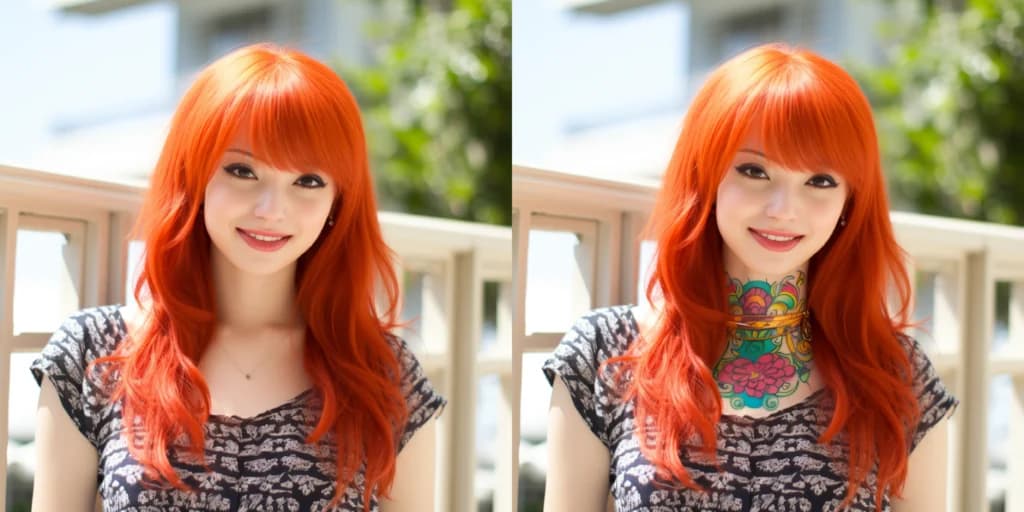
Check out the image below. I generated it with Midjourney, then added a neck tattoo with the Vary (Region) feature. The quality certainly gives Firefly a run for its money.
I created this image in Midjourney, and then used the Vary(Region) function to add a neck tattoo to the lady.
Midjourney has all the standard image generation modes like text-to-image, text + image-to-image, image overlaying, and even reverse image prompting which allows you to upload an image and generate a text prompt.
Midjourney works on its website, midjourney.com, as well as in Discord. The web Editor is where the Firefly-style tools live: you can erase and regenerate parts of an image (Vary Region), pan, zoom out, and even upload your own photos to edit. The current V8.2 model, the default since July 2026, also brought an Edit model that changes images from written instructions (Midjourney).
Given the extremely high-quality images provided by Midjourney, and its own type of generative fill functionality called Vary (Region), it's still my pick for the best Adobe Firefly alternative.
Created using Midjourney v5.1
Key Features
- Image Generation: Midjourney provides a suite of image generation tools including text-to-image, image-to-image, reverse image prompting (describe), and image overlaying functionalities.
- Advanced Control: Midjourney supports a wide array of syntax options allowing you to craft highly customized images suited to your needs.
- Generative Fill Alternative: The Editor's Vary (Region) tool lets you erase part of an image and regenerate it with a prompt, on Midjourney images or your own uploads.
- Availability: Midjourney runs in your browser at midjourney.com, as well as in Discord.
Pricing
- Free: Midjourney doesn't have a free plan.
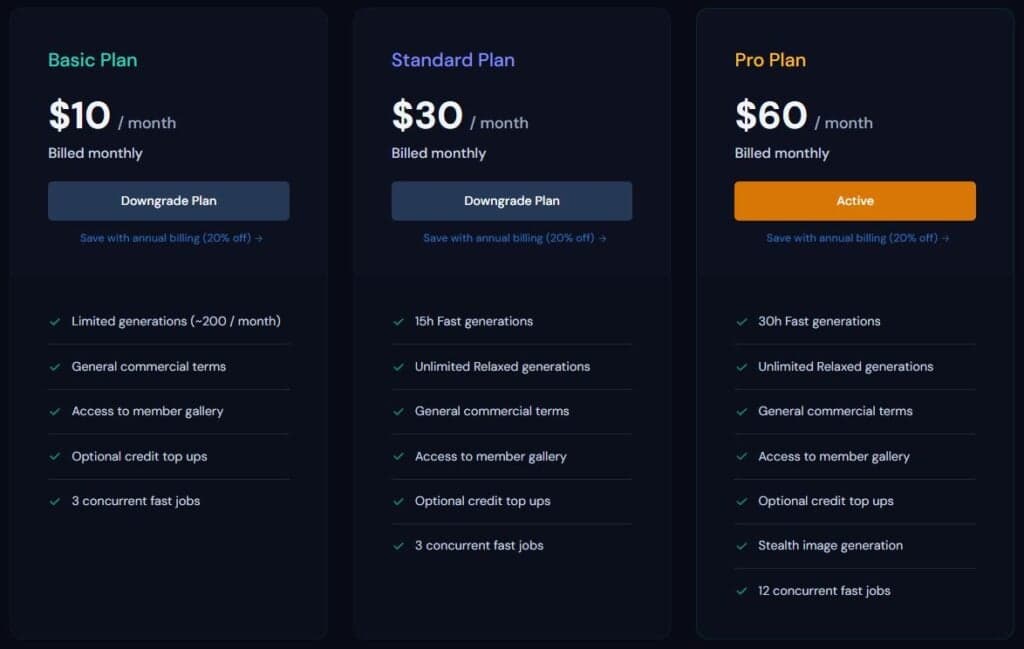
- Basic Plan: $10/month for 3.3 hours (200 minutes) of fast generations and 3 concurrent jobs.
- Standard Plan: $30/month for 15 hours of fast generations plus unlimited image generations in Relax mode.
- Pro Plan: $60/month for 30 hours of fast generations, 12 concurrent fast jobs, and Stealth Mode to keep your images private.
- Mega Plan: $120/month for 60 hours of fast generations, 12 concurrent fast jobs, and Stealth Mode.
- Paying yearly takes 20% off every plan (Midjourney).
Benefits
- Superior Quality: With a focused approach on image generation, Midjourney produces some of the highest-quality AI images available.
- Online Resources: The popularity of Midjourney has led to a plethora of easily accessible online resources.
- Accessibility: Midjourney runs in any browser at midjourney.com, as well as in Discord, so you can create AI images anytime, anywhere.
Drawbacks
- Some people have ethical concerns with the images Midjourney was trained on
- No free plan
2. Leonardo
Leonardo provides AI image generation with an impressive range of features and capabilities. It's now owned by Canva but still runs as its own product (Canva).
Alongside its own models like Phoenix and Lucid Origin, Leonardo gives you partner models such as Nano Banana, GPT Image and FLUX inside the same app, so you can generate images in a huge range of styles.
Leonardo supports different types of prompt types for image generation, including text, image prompts, and image-to-image.
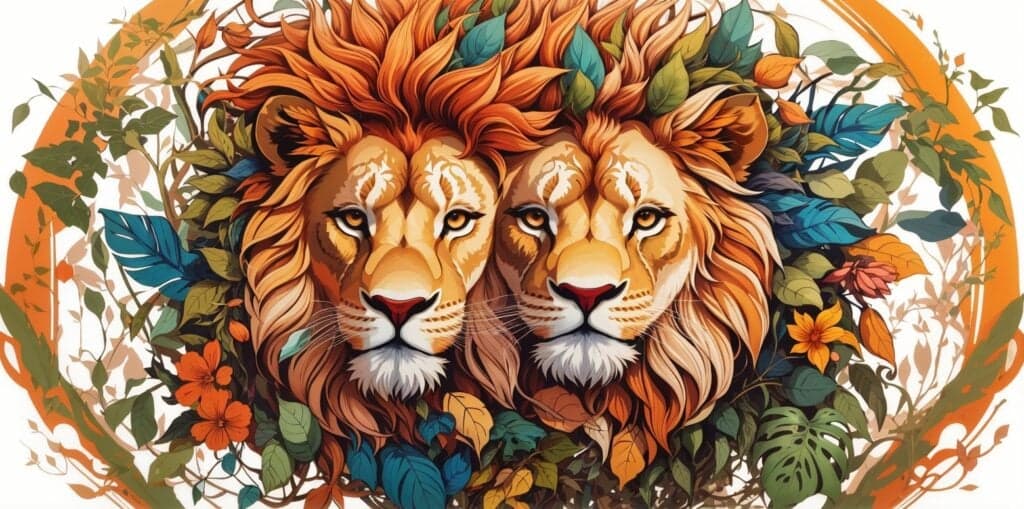
When I first tested it, Leonardo's Alchemy and Prompt Magic v2 features made impressive 2D images, like this one. 👇
Once your image generation is complete, Leonardo allows you to refine your creation further with its post-processing features.
Upscaling, unzooming, background removal, and transfer to the Canvas are all options available to you for enhanced control and post processing of your generated images.
Leonardo's Canvas Editor fully qualifies it as one of the Firefly alternatives. Extend, mask, replace, and erase elements indefinitely and effortlessly, and regenerate specific areas to achieve your desired output.
These days there's also an Inline Editor: open any image, type what you want changed, and Leonardo's Omni models make the edit, with up to six reference images depending on the model.
Alongside its ability to generate images, I was quite impressed with Leonardo's inpaint/outpaint functionality. See below for an example where I removed the glasses from the lady.
An example I generated to remove the women's glasses using Leonardo's take on generative fill.
Leonardo also features an LLM for automatic prompt generation describing your digital art, which I thought was a neat feature.
You can also train your own custom models (Leonardo calls them Elements) on your own images, and Leonardo has branched out into video and 3D generation too.
I've covered every tool in depth in my Leonardo AI review.
Leonardo is a comprehensive AI art generator that offers a seamless design process and control over your creations, making it a competitive choice in my list of Firefly alternatives in second place.
Key Features
- Own and Partner Models: Leonardo's own Phoenix and Lucid Origin models sit alongside partner models like Nano Banana, GPT Image and FLUX.
- Post-Processing Options: Leonardo offers post-processing features such as upscaling, unzooming, background removal, and transfer to Canvas, allowing you to better refine images.
- Generative Canvas: The Canvas Editor offers capabilities similar to Adobe's generative fill, including extend, mask, replace, and erase options, plus a prompt-based Inline Editor.
- Custom AI Model Training: You can train your own Elements on your images, perfect for consistent characters, styles, or products.
Pricing
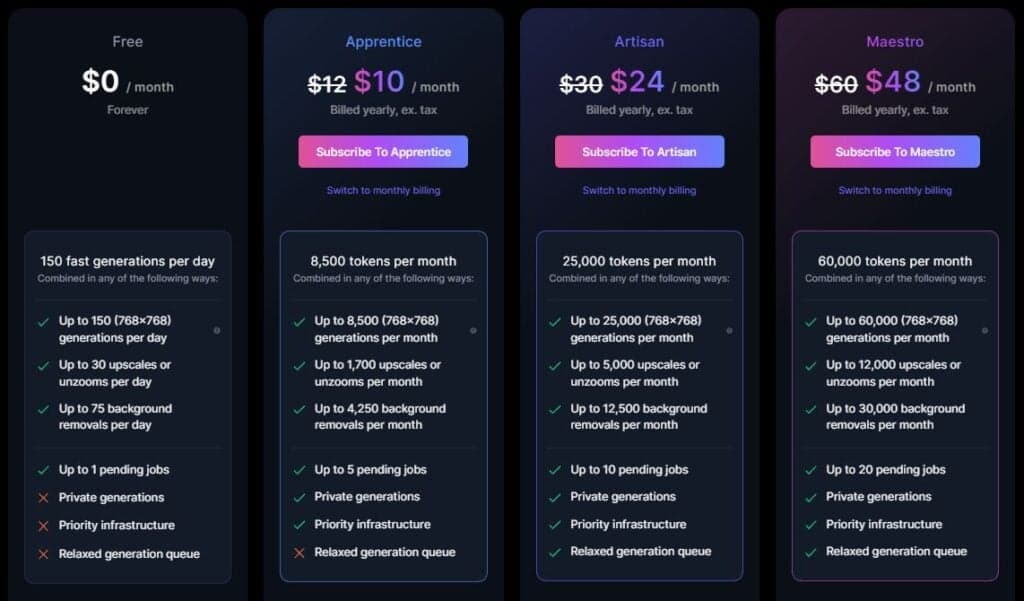
Leonardo has renamed and repriced its plans since I took this screenshot.
Leonardo offers 4 pricing tiers:
- Free: 150 fast tokens a day – enough to get a feel for Leonardo.
- Essential: 8,500 fast tokens a month with private generations at $12/month ($10/month billed yearly).
- Premium: 25,000 fast tokens a month plus unlimited relaxed image generations on select models at $30/month ($24/month billed yearly).
- Ultimate: 60,000 fast tokens a month plus unlimited relaxed image and video generations on select models at $60/month ($48/month billed yearly).
Benefits
- Comprehensive Art: Leonardo's wide range of features and capabilities offer control and flexibility to the user.
- Inpaint/Outpaint Functionality: Leonardo's inpaint/outpaint functionality allows for easy modifications.
- Language Model for Prompts: Automatic prompt generation is possible, adding to the tool's convenience and efficiency.
Drawbacks
- Leonardo can be overwhelming for new users.
3. ChatGPT Images
ChatGPT Images is OpenAI's image generator, built right into ChatGPT. It replaced DALL·E 3, which is what I originally tested for this list.
OpenAI has since retired DALL·E 2 and DALL·E 3 altogether, and their API access ended in May 2026 (OpenAI).
The current version, ChatGPT Images 2.5, can create images from a prompt and edit them. Select part of an image with the selection tool and describe the change, or just describe the edit in chat. It works on your own uploaded photos too, which makes it a proper generative fill alternative (OpenAI).
Back when I tested DALL·E, outpainting was only available in the Dall-E web app (not ChatGPT).
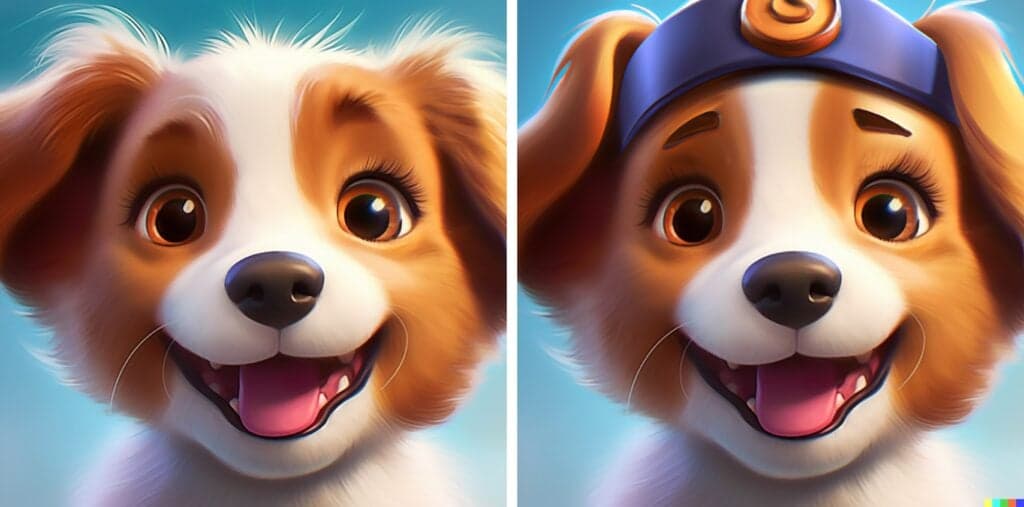
To get a feel for Dall-E's outpainting, I took an image of a puppy and used Dall-E to give it a beanie. The results weren't bad!
An example of Dall-E's Inpainting functionality with a Midjourney puppy (left) and Dall-E Outpainted 'beanie' (right).
The image quality from Dall-E 3 was already significantly better than what we'd seen in Dall-E 2. Check out the two images below where I used the same prompt in Dall-E 2 and Dall-E 3 to compare the difference.
An example of Dall-E 2 Vs. Dall-E 3 puppies!
Another thing I noticed right away with Dall-E 3 was strict restrictions on specific words. For example, I wasn't able to use the word "Disney" in my prompt, assumably due to fears of copyright issues.
Key Features
- Built Into ChatGPT: ChatGPT Images is available on every ChatGPT plan, on the web, iOS and Android.
- Select and Edit: Highlight part of an image and describe what to add, remove, or change, similar to Firefly's generative fill.
- Edit Your Own Photos: Upload any image and describe the changes you want, or ask for text and transparent backgrounds.
Pricing
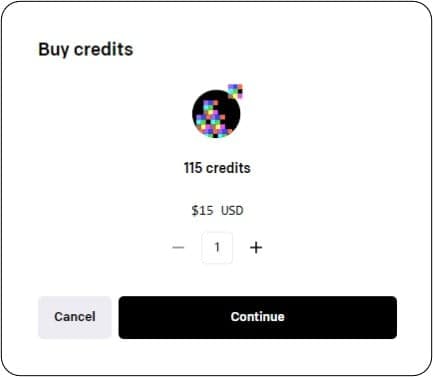
Old screenshot: DALL·E 2's credit packs are long gone.
- ChatGPT Images is included on the free ChatGPT plan, with limited image creation.
- Paid plans (Go, Plus, and Pro) raise the limits, and Pro gets unlimited, faster image creation (ChatGPT pricing).
Benefits
- Quick Start: Easy access and quick to use for anyone who already uses ChatGPT.
- Edit by Chatting: You can keep refining an image just by describing more changes.
Drawbacks
- Selections aren't always precise, so edits can spill outside the area you highlighted.
4. Runway
Runway is an AI art generator that boasts the widest range of capabilities of any of the tools I tried.
When I first tested it, Runway's flagship was Gen-2. It's now on Gen-4.5 for video generation, plus Aleph for editing existing footage.
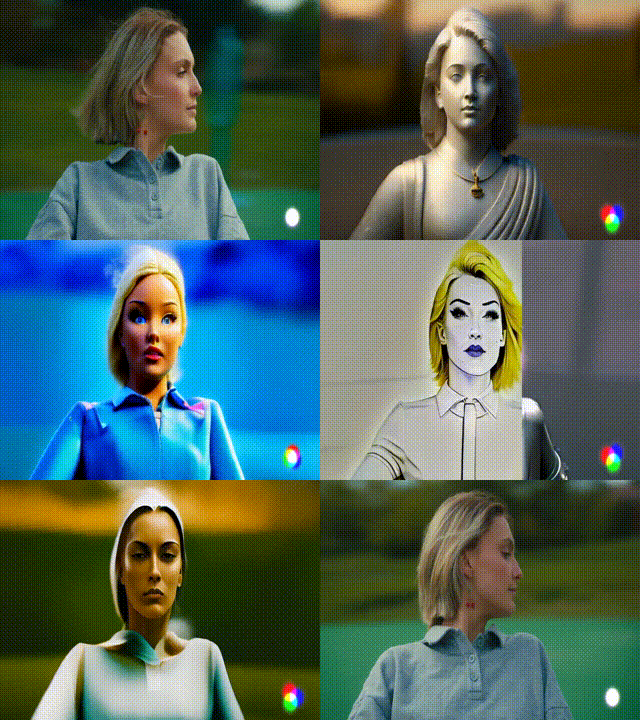
Runway has earned the most notoriety for its generative AI video content capabilities and features a video-to-video tool which allows you to take existing footage and change the style – the clip below shows what you can do with Runway's video-to-video feature.
Video-to-video using Runway Gen-1 (GIF: Runway)
Runway's AI video features can do a lot more than video-to-video now. Its Aleph model can add, remove, and transform objects in a video, generate new camera angles, and change the style and lighting of a shot, all from a text prompt (Runway). Aleph 2.0 goes further: edit one frame and Runway applies the change to the rest of the clip.
On top of the video features, Runway makes images with its Gen-4 Image model and gives you partner image models like Nano Banana Pro, as well as music, voice, and sound effects generation.
When I tested it, the biggest drawback of Runway was image quality, which lagged behind tools that focused on one area of generative AI only. Runway now hosts partner image models too, so that's less of an issue.
Given its huge range of tools and the strongest video editing on this list, Runway holds fourth place as an Adobe Firefly alternative.
Key Features
- Video Editing by Prompt: Aleph adds, removes, and changes objects in footage, which is like generative fill for video.
- Video Generation: Gen-4.5 is Runway's latest text-to-video and image-to-video model.
- Multi-Modal Tools: Runway also generates images (including partner models like Nano Banana Pro), music, voice, and sound effects.
- Web and Mobile Apps: Runway works in your browser and has apps for iPhone and Android.
Pricing
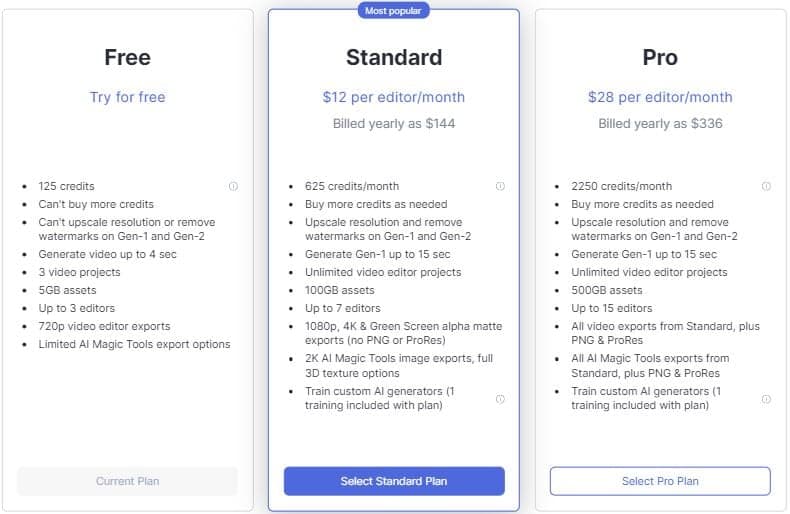
Runway's plans have changed since I took this screenshot.
- Free: Runway gives you 125 one-time credits when you make an account. They don't renew, but they're enough to test if you like the product.
- Standard: 625 credits a month for $15/month ($12/month billed yearly).
- Pro: 2,250 credits a month for $35/month ($28/month billed yearly).
- Max: 9,500 credits a month for $95/month ($76/month billed yearly), with up to a month of unused credits rolling over (Runway).
Benefits
- Vast Features: Runway outperforms many competitors in terms of breadth of functionality and capability to generate images and video.
- Strong AI Video Tools: Runway's generative AI video tools are some of the best around.
- Cost Efficiency: With the inclusion of various generative tools under one subscription, Runway provides a cost-effective solution for users needing a range of functionalities.
Drawbacks
- Video eats credits fast, and Standard and Pro credits don't roll over to the next month
- It's built for video first, so it's overkill if you only want to touch up photos
5. Google Gemini (Nano Banana)
Google Gemini has become one of the easiest ways to edit images with AI, thanks to Google's image model, Nano Banana.
Upload a photo, tell Gemini what to change, and it makes the edit. You can swap a sunny day for a moody night, change the camera angle, restyle the whole image from a reference photo, or combine two photos into one (Google).
It's also good with text, so logos, posters, and invites come out with clear, readable words in many languages.
Nano Banana 2 is free in the Gemini app, and Google AI plans unlock Nano Banana 2.1, Google's best image model, with higher limits.
Adobe even offers Google's Nano Banana models inside Firefly and Photoshop's Generative Fill, which tells you how far it's come.
If you want Firefly-style edits for free, with nothing more than a text prompt, Gemini is a great place to start.
Key Features
- Prompt-Based Editing: Describe the change you want and Gemini edits your photo for you.
- Combine Photos: Blend multiple images into one scene.
- Character Consistency: Keep a person or character looking the same across images.
- Clear Text: Add readable text to logos, posters, and invites, in many languages.
Pricing
- Free: Nano Banana 2 is free in the Gemini app.
- Google AI Plus: $4.99/month for twice the usage of the free plan and access to Nano Banana 2.1.
- Google AI Pro: $19.99/month for four times the usage of the free plan, plus Google's other premium AI features (Google).
Benefits
- Free to Start: The base Nano Banana model costs nothing to use.
- No Learning Curve: If you can describe it, you can edit it.
- Works Everywhere Gemini Does: Image generation is available in every country and language where the Gemini app is.
Drawbacks
- Higher limits and Google's best image model, Nano Banana 2.1, need a paid Google AI plan.
Who Should Use Adobe Firefly Alternatives?
Anyone who wants AI images or Firefly-style edits without an Adobe subscription, or who wants better results than Firefly gives them, should try these alternatives.
Generative AI image and video tools can be used by creatives looking to come up with ideas and spark creativity, businesses looking to save time and money on image or logo generation, Freelancers looking to sell their creations, researchers looking to quickly and easily visualize concepts for their audience, teachers can use them to create custom learning materials, entertainers can create realistic environments and characters, the possibilities are endless.
The best part about these tools is how easily accessible and user-friendly most of them are. With just a few clicks of your mouse, you can be using cutting-edge technology and seriously level up your productivity and creativity.
If you're mainly after image generation, my list of Midjourney alternatives covers even more options.
Wrapping Up
Adobe Firefly brought a lot of attention to the generative AI space with its high-quality generative fill feature when it launched in 2023.
As you can see in the examples I provided in this article, the tools each have unique strengths and weaknesses that can compete with Firefly.
Midjourney is my choice for the best Firefly alternative due to the extremely high quality outputs and versatility of its Vary (Region) functionality. Leonardo is a close second.

#1 Midjourney 🥇
Midjourney makes some of the highest quality AI images around, with the widest range of styles. Its web Editor and Vary Region feature make Midjourney my pick for the best Firefly alternative.