Suno is free to use, with 50 credits a day for about 10 songs, but you need a paid plan to download your songs and use them commercially. Pro costs US$10 a month, Premier US$30, and Platinum US$120, and paying yearly takes up to 20% off.
Below I’ve broken down what each plan gets you, how many songs the credits actually make, how downloads and rights work, and which plan I’d pick. Every price comes from Suno’s own pricing page, in US dollars, before tax.
Suno pricing plans compared
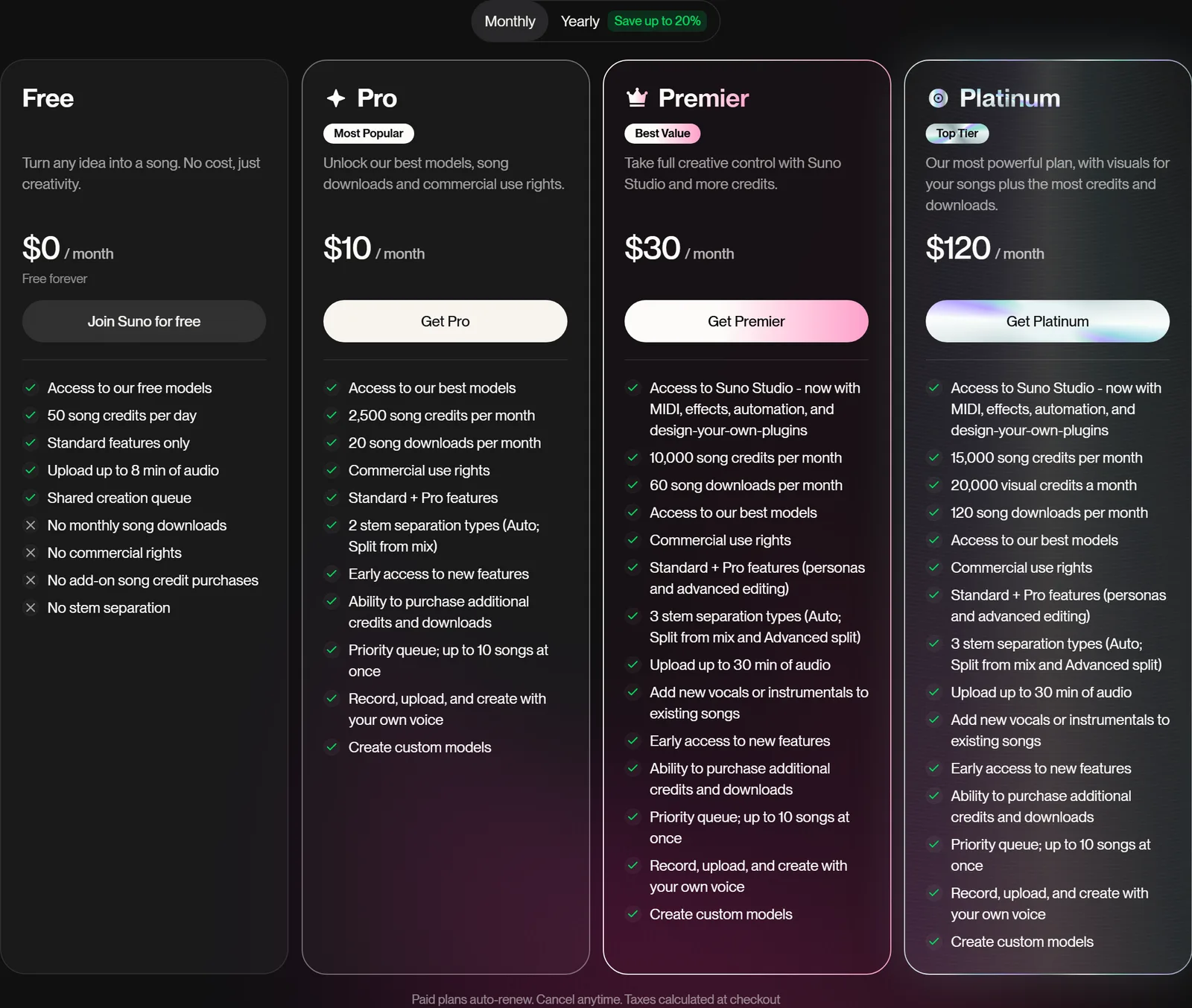
Suno has four plans: Free, Pro, Premier, and Platinum. The three paid plans all add downloads, the v6 and v6-wild models, and commercial use rights, and they differ in how many credits and downloads you get each month. Here’s the full comparison, in US dollars.
| Free | Pro | Premier | Platinum | |
|---|---|---|---|---|
| Monthly price | $0 | $10 | $30 | $120 |
| Paid yearly | $0 | $8 a month ($96 a year) | $24 a month ($288 a year) | $100 a month ($1,200 a year) |
| Song credits | 50 a day | 2,500 a month | 10,000 a month | 15,000 a month |
| Songs, roughly | 10 a day | 500 a month | 2,000 a month | 3,000 a month |
| Downloads | None (you can buy them) | 20 a month | 60 a month | 120 a month |
| Models | v6-mini | v6, v6-wild, and v6-mini | v6, v6-wild, and v6-mini | v6, v6-wild, and v6-mini |
| Commercial use | No | Yes | Yes | Yes |
| Songs generating at once | 4, in a shared queue | 10, in a priority queue | 10, in a priority queue | 10, in a priority queue |
| Audio uploads | Up to 8 minutes | Up to 30 minutes | Up to 30 minutes | Up to 30 minutes |
| Stems | No | 2 split types | 3 split types | 3 split types |
| Voices and custom models | No | Yes | Yes | Yes |
| Suno Studio | No | No | Yes | Yes |
| Visual credits | Buy packs | Buy packs | Buy packs | 20,000 a month |
| Extra song credits | Can't buy | Can buy | Can buy | Can buy |
Pro is Suno’s most popular plan. Platinum is the newest, and Suno only sells it on the website, not in the app.
Is Suno free?
Yes. Suno’s free plan costs nothing and gives you 50 credits a day, which is enough for 10 songs on v6-mini, Suno’s free model. You can write your own lyrics in Custom mode, extend and cover your songs, upload up to 8 minutes of audio, and share everything you make by link.
The catch is what you can do with those songs afterwards:
- No downloads. Free accounts get 0 downloads, so you listen and share on Suno, or buy downloads.
- No commercial use. Free-plan songs are for personal, non-commercial use, and subscribing later doesn’t make them commercial.
- Only v6-mini. The v6 and v6-wild models, which Suno says give you more control and range, are on paid plans.
- No pro tools. Stems, Voices (singing with your own voice), custom models, add vocals, and advanced editing are all paid features.
- A slower queue. Free songs generate four at a time in a shared queue, while paid plans get ten at a time in a priority queue. Free accounts can’t buy extra credits either.
So the free plan is great for trying Suno and making songs for fun. The moment you want a song on Spotify, in a YouTube video, or just on your phone as an MP3, you need a paid plan. If you’re new to it, my guide on how to use Suno walks you through your first song.
How much is Suno Pro?
Suno Pro costs US$10 a month, or US$96 a year, which works out to US$8 a month. It’s the cheapest way to download your songs and own the commercial rights to them. Pro adds:
- 2,500 credits a month, enough for about 500 songs
- 20 downloads a month, in MP3 or WAV
- The v6 and v6-wild models
- Commercial use rights for songs you make while subscribed
- Voices, so Suno sings with your own voice, and up to three custom models trained on six or more of your own songs
- Stems (up to 12 from one song), add vocals, add an instrumental, and advanced editing
- Ten songs generating at once in a priority queue, and audio uploads of up to 30 minutes
- The option to buy extra credits and downloads
How much is Suno Premier?
Suno Premier costs US$30 a month, or US$288 a year, which works out to US$24 a month. It has everything in Pro, plus:
- 10,000 credits a month, enough for about 2,000 songs
- 60 downloads a month
- Suno Studio, Suno’s multitrack music workstation in the browser, with MIDI, effects, automation, and plugins you design yourself. Work inside Studio isn’t counted against your downloads.
- Advanced Split for stems, where you pick from nearly 100 instruments to separate
- MIDI downloads for songs made in Studio
Premier is for people who make music most days, need more than 20 downloads a month, or want Studio.
How much is Suno Platinum?
Suno Platinum costs US$120 a month, or US$1,200 a year, which works out to US$100 a month. It has everything in Premier, plus 15,000 credits a month (about 3,000 songs), 120 downloads a month, and 20,000 visual credits a month for Suno Visuals, which makes images and 5 to 15 second video clips for your songs.
Platinum only pays off if you’ll use those visual credits every month. For a full-length music video, Neural Frames turns your whole song into one video in one go, and my Suno music video guide compares the two.
How do Suno credits work?
Suno credits pay for making music. Every Create costs 10 credits and gives you two songs, so each song costs 5 credits on any model.
10 credits make two songs
How many songs each Suno plan makes
Standard Creates on v6, v6-wild, or v6-mini. Max Mode, stems, and prompts with lots of images or videos use more credits.
- When credits reset. Free credits top back up to 50 once a day, on UTC time. Paid credits reset once a month, at the same date and time you first subscribed. Yearly plans top up monthly too.
- Credits don’t roll over. Whether you use 10 credits or all of them, you start the next day or month with the same amount.
- Running out on a paid plan. You get the free 50 credits a day until your monthly credits reset, and songs you make with them still come with commercial rights while you’re subscribed.
- Buying more. On Pro and up, go to suno.com/account and choose Buy More Credits. Bought credits don’t expire, but you need an active subscription to use them. Free accounts can’t buy credits.
- What costs more. Max Mode, which Suno suggests for songs over two minutes and close covers, uses extra credits, and so do prompts with lots of images or videos. Stems cost 50 credits for an Auto Split into up to 12 stems, or 10 credits a stem.
Suno Visuals runs on separate visual credits. Platinum includes 20,000 a month, and anyone can buy packs.
How do Suno downloads work?
Suno counts downloads by song: one song is one download, however many formats you grab. Pro includes 20 downloads a month, Premier 60, and Platinum 120. The free plan includes none, but you can buy them.
- Formats. MP3 works on every plan. WAV needs a paid plan and suno.com, because the app always gives you MP3. You can also download a song as a video, its stems, and MIDI for songs made in Studio.
- Re-downloads are free. Downloading the same song again, in another format, or with its stems doesn’t use another download, and failed downloads don’t count.
- They don’t roll over. Monthly downloads reset each month, but downloads you buy carry over.
Can you use Suno songs commercially?
Yes, if you made the song on a paid plan. Songs made and downloaded while you’re subscribed to Pro, Premier, or Platinum come with commercial use rights, and Suno doesn’t take a cut of what you earn. You can:
- Release them on Spotify and Apple Music through any distributor
- Use them in YouTube and TikTok videos, films, and games
- Sell them yourself, on Bandcamp for example
Free-plan songs stay non-commercial forever: Suno doesn’t give rights retroactively by default when you subscribe. Songs you make while subscribed keep their rights after you cancel. Commercial rights aren’t copyright, though: whether your song qualifies for copyright is up to your country’s copyright office, not Suno.
Which Suno plan should you get?
Start on the free plan, and upgrade to Pro when you want to download a song or make money from it. Here’s who each plan suits:
- Free: trying Suno out, and songs for fun that you share by link.
- Pro (US$10 a month): most people. You get downloads, commercial rights, Suno’s best models, and about 500 songs a month.
- Premier (US$30 a month): people who need more than 20 downloads a month, make music most days, or want Suno Studio.
- Platinum (US$120 a month): people who’ll use 20,000 visual credits a month, or need 120 downloads.
Pay monthly for your first month or two. Suno rarely gives refunds, and you’ll soon know whether you need more than Pro. Once you’re sure, paying yearly saves you up to 20%. Whichever plan you’re on, my Suno prompts and free Suno prompt generator help your credits go further.
Suno prices in pounds, euros, and Australian dollars
Suno charges in 17 currencies, and outside the US the price isn’t a straight conversion. Here are the monthly prices on Suno’s pricing page, with the monthly cost of a yearly plan in brackets:
| Currency | Pro | Premier | Platinum |
|---|---|---|---|
| US dollars | $10 ($8) | $30 ($24) | $120 ($100) |
| British pounds | £8 (£6) | £22 (£18) | £90 (£75) |
| Euros | €9 (€7.20) | €28 (€22) | €110 (€90) |
| Australian dollars | A$15 (A$12) | A$45 (A$35) | A$175 (A$145) |
| Canadian dollars | C$14 (C$11) | C$40 (C$35) | C$165 (C$135) |
| Indian rupees | ₹850 (₹680) | ₹2,500 (₹2,000) | ₹11,500 (₹9,500) |
The prices are before tax, which Suno adds at checkout, including VAT in the EU. Suno takes Visa, Mastercard, and American Express, with Apple Pay, Google Pay, and Cash App Pay in some countries. To pay with PayPal, set it as your App Store or Google Play payment method and subscribe in the Suno app.
How to cancel a Suno subscription
To cancel Suno, go to suno.com/account, choose Cancel Subscription at the top of the page, and confirm. If you subscribed in the app, cancel through the store instead:
- iPhone: open Settings, tap your name, then Subscriptions, then Suno, and choose Cancel Subscription.
- Android: open Payments & subscriptions in your Google account, tap Manage subscriptions, then Suno, and choose Cancel Subscription.
Your plan keeps working until the end of the billing period, then drops to the free plan, and you keep the rights to songs you made while subscribed. Suno’s payments are final unless it decides otherwise, but it does fix mistakes, like a yearly plan bought instead of a monthly one, or a subscription with no songs made on it. If it’s only been a day or two, email support@suno.com.
Want to delete your account as well? Cancel first, then follow the steps in my guide on how to delete a Suno account.
Wrapping up
Suno’s pricing comes down to this: it’s free to try, US$10 a month to download your songs and own the commercial rights, and US$30 or more for Studio and heavy use. Most people only ever need Pro. If you’re making videos for your songs, my Suno music video guide covers what that costs on top.