What is freebeat AI?
freebeat AI (hosted at freebeat.ai) is a browser-based AI music video generator aimed at songwriters, producers, and social creators. Quick clarification up front: it has nothing to do with the Freebeat exercise bike company — same name, completely different business.
The hook on the homepage is minimal friction. You can either paste a link (SoundCloud, Suno, Udio, or YouTube) or upload an audio file directly, then pick from six preset modes: Music Video, Dance Video, Lyric Video, Realtime Music Video, Photo Karaoke, and Onbeat Effects, alongside newer tools like Super Agent and Clone Video.
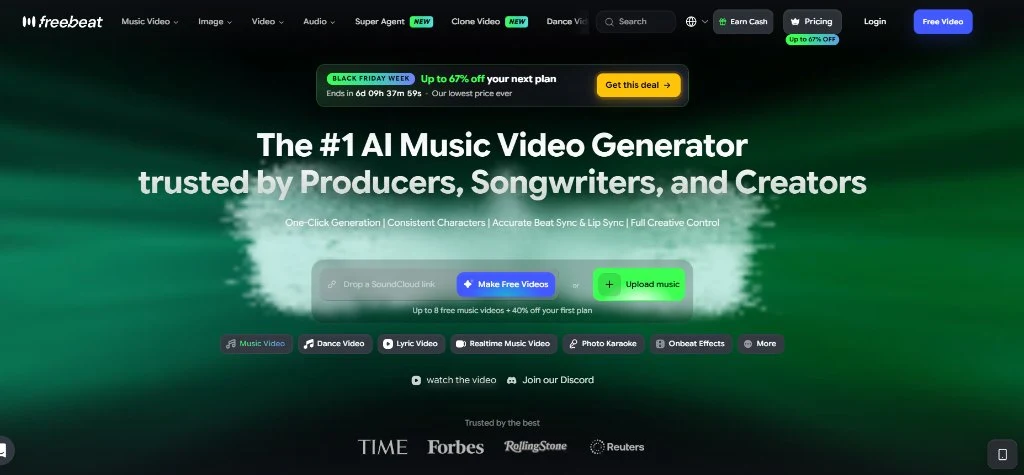
One important catch on the paste-a-link shortcut: if your track came from Suno and you plan to monetise the video on YouTube, Suno's terms only grant commercial rights to songs you downloaded directly from Suno on a paid plan. Always upload the downloaded WAV or MP3 instead of pasting a link for commercial releases (see my Suno music video guide for details).
Inside Freebeat 2.0 & Super Agent
Inside the app, freebeat has shifted from simple single-purpose templates to its Freebeat 2.0 Agent workspace. Instead of building a timeline clip by clip, you attach your track, describe the vibe in a chat-style prompt box (using `@` to reference uploaded photos or character files), and let the Agent decode your song's tempo, bars, and sections to plan the shots automatically.
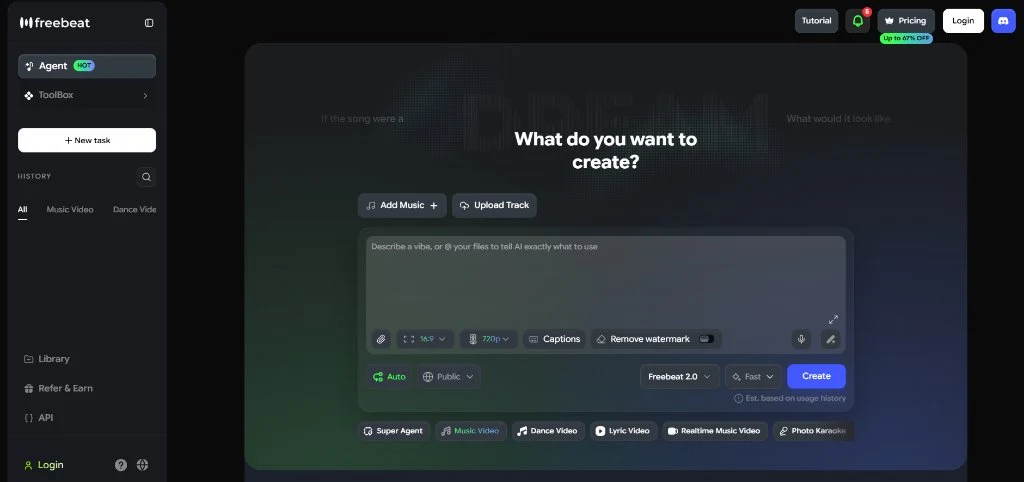
It's genuinely approachable if you hate video editors, but pay close attention to the default toggles along the bottom of that composer before hitting Create:
- 720p is the default resolution — and on Basic and Pro, it's also the ceiling.
- Public visibility is toggled on by default — check it if you're working on an unreleased track.
- Remove watermark sits as its own toggle and requires a paid plan.
- Control stays prompt-first: unlike Neural Frames, there's no eight-stem audio reactivity engine or frame-by-frame timeline where you can wire a kick drum or vocal line to camera motion.
Evaluating freebeat on lip sync & Photo Karaoke
Lip sync is easily freebeat's standout party trick — especially if you want to turn a single photo into a singing performance for a chorus or hook.
Photo Karaoke takes a portrait or selfie, pairs it with your song, animates mouth and head movement to the vocal track, and layers synchronised captions over the top. On short 15-to-45-second clips with clean, front-facing lighting and clear vocals, the sync lands close to the rhythm without much prompt engineering. Dance Video and Clone Video push the same idea further, matching choreography or motion references to kick and snare hits.
Where it shows cracks is over a full 3-minute release:
- Heavy backing vocals, ad-libs, or dense mixes can confuse the mouth timing.
- Characters can still drift in likeness across multiple scene cuts, especially if you aren't using higher-cost models like Seedance.
- Exporting a talking/singing close-up at 720p makes AI compression artefacts around the eyes and teeth much more obvious on desktop or TV screens.
If you want lip sync inside a sharper, multi-scene music video up to 4K, Neural Frames' Autopilot Vocal Video mode (powered by Kling 3.0) paired with locked characters and Environments holds together much better over a full song.
freebeat AI pricing, promos & Boost Packs
freebeat runs a four-tier subscription ladder, almost always displayed alongside "limited-time" 20% to 29% promo discounts or seasonal banners. You rarely need to hunt for a third-party freebeat promo code because the discount is already applied on the pricing page — what matters is watching the regular renewal rate and the 720p vs 1080p cutoff:
| Plan | Regular price | Common promo | Credits | Max export | Headline limits |
|---|
| Basic | $6.99/week | $4.99/week (29% off) | 1,990 / week | 720p | Up to 20 music videos / wk, 13 Seedance videos |
| Pro | $34.99/month | $26.99/month (23% off) | 10,000 / month | 720p | Up to 105 music videos, 69 Seedance videos, Suno & MiniMax music |
| Ultimate | $49.99/month | $39.99/month (20% off) | 19,000 / month (up to 57k) | 1080p | Unlimited AI videos, up to 200 music videos, 131 Seedance videos |
| Creator | $249.00/month | $199.00/month (20% off) | 95,000 / month (up to 285k) | 1080p | Unlimited AI videos, up to 1,000 music videos, Nano Banana Pro & GPT Image |
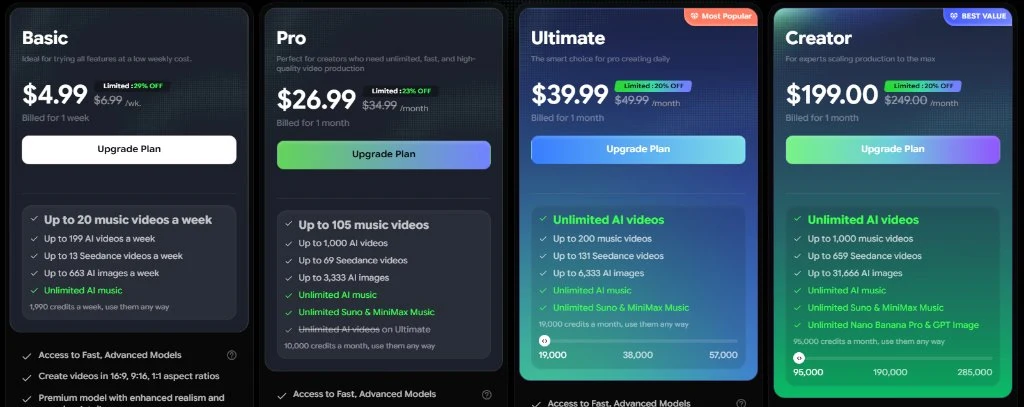
Three things jump out from that pricing card:
- Basic bills weekly, not monthly. At the regular $6.99/week rate, leaving Basic running for a month costs about $28–$30 — while keeping you locked at 720p.
- 1080p starts at Ultimate ($49.99/month regular). Both Basic and Pro cap out at 720p, and even Ultimate's "Unlimited AI videos" badge sits beside a fixed 19,000-credit allowance for music videos and premium Seedance renders.
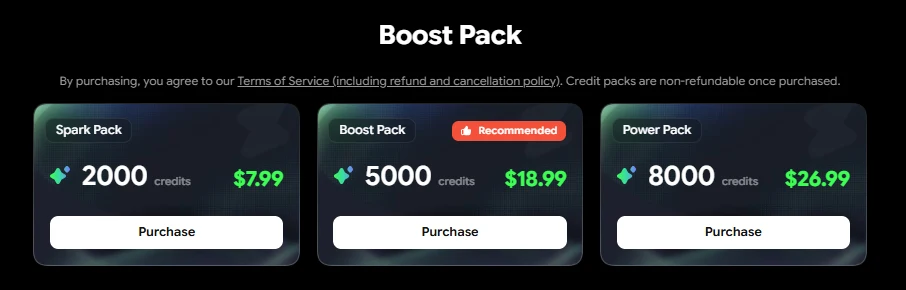
- Top-up Boost Packs are non-refundable. If your project runs dry mid-render, freebeat sells one-off Boost Packs — and explicitly states right above the cards that credit packs are non-refundable once purchased:
| Boost Pack | Credits | Price | Approx. rate |
|---|
| Spark Pack | 2,000 credits | $7.99 | ~0.40¢ / credit |
| Boost Pack (Recommended) | 5,000 credits | $18.99 | ~0.38¢ / credit |
| Power Pack | 8,000 credits | $26.99 | ~0.34¢ / credit |
Is freebeat AI really free?
You can test it for free — the homepage advertises up to 8 free music videos — so you can judge the workflow before paying. Just don't expect to publish a monetised YouTube release off the free tier: free exports carry a freebeat watermark and are restricted to non-commercial use. Once you flip the watermark toggle off or want commercial rights, you're on a paid plan.
Is freebeat AI legit? What Trustpilot reviews say
Yes, freebeat is a real product with standard Stripe billing — it isn't a scam site that steals your card. That said, its customer reputation is a genuine red flag you should weigh before subscribing.
On Trustpilot, freebeat.ai currently carries a 1.5 out of 5 ("Bad") TrustScore across more than 300 reviews. Reading through the complaints, the same four themes appear repeatedly:
- Credits burned on failed or glitched renders: users report thousands of credits evaporating when a long generation stalls, glitches, or ignores the prompt.
- Unexpected recurring charges: especially from creators who thought the $4.99–$6.99 Basic tier was a one-off purchase rather than a weekly auto-renewing subscription.
- Strict no-refund policy: subscriptions aren't prorated or refunded for unused time, and Boost Packs are strictly non-refundable.
- Slow customer support: reviewers frequently report waiting days — or getting no reply at all — when emailing support over burned credits.
Contrast that with Neural Frames, which holds a 4.0 / 5 ("Great") TrustScore on Trustpilot, never deducts credits for failed generations, includes one free re-render per minute of video, and rolls unused credits over while you stay subscribed.
freebeat AI pros and cons
What I like
- Very fast link-to-video onboarding (SoundCloud, Suno, Udio, YouTube)
- Strong focus on Photo Karaoke, Lip Sync, and Dance Video modes
- Freebeat 2.0 Agent keeps prompting simple for beginners
- Low $4.99–$6.99 weekly entry price if you only want a quick 720p test
What I don't
- Basic and Pro cap exports at 720p; 1080p requires $49.99/mo Ultimate (and no 4K)
- Weekly auto-renew on Basic catches people out
- 1.5/5 TrustScore across 300+ Trustpilot reviews (credit burn & support)
- No credit rollover and non-refundable Boost Packs
- Prompt-heavy workflow with no eight-stem audio reactivity or timeline control
How to cancel a freebeat AI subscription
If you tried freebeat and want to make sure you aren't billed again — especially on the weekly Basic plan — cancel before your current billing cycle rolls over:
- Sign in to your account at freebeat.ai.
- Open your Profile / Billing settings or navigate directly to the Pricing page while logged in.
- Locate your active subscription and click Cancel auto-renew, then follow the confirmation prompts until you see the cancelled status.
- Screenshot the cancellation confirmation (and check your email for a Stripe cancellation receipt) for your records.
Once cancelled, you keep your paid access and remaining credits until the end of the period you already paid for, then your account drops back to the free tier. Because freebeat's terms exclude prorated refunds (and Boost Packs are non-refundable), if you hit a genuine billing error or lost credits to a technical failure, email support@freebeat.ai immediately with your receipt and job IDs.
Verdict: why I recommend Neural Frames instead
freebeat is fine as a fast playground for short lip-sync tests, but I wouldn't make it my main home for releasing music. Paying $34.99/month for 720p — or $49.99/month for 1080p with no credit rollover and a 1.5-star support reputation — is hard to justify when better musician-first tools exist.
For almost any independent artist or creator, Neural Frames is the smarter pick:
- Real audio sync: splits your song into eight stems so visuals hit the drums, bass, and vocals instead of cutting generically on bars.
- 1080p from the start, 4K on Ninja+: no 720p paywall on paid tiers, plus full commercial ownership.
- Fair credit rules: unused credits roll over (up to 3×), failed renders cost zero credits, and you approve the storyboard before rendering video.
- Proven support: 4.0/5 TrustScore on Trustpilot and a free start with no credit card needed.
Want to compare the two feature by feature? Read my freebeat vs Neural Frames comparison, browse the 7 best freebeat alternatives, or dive into my full Neural Frames review.
Try Neural Frames free (no credit card needed) →