Quick verdict: would I recommend freebeat or Neural Frames?
I recommend Neural Frames for almost every musician and creator releasing real tracks. It's the only one of the two that genuinely listens to your song stem by stem, lets you approve and tweak a storyboard before burning big credits, exports up to 4K, rolls unused credits over, and doesn't charge you when an AI render glitches out.
freebeat wins on one narrow thing: raw speed from a pasted link to a lip-synced or dancing character. If you want to test a 30-second Photo Karaoke clip from a SoundCloud or Suno link without touching an editor, freebeat gets you there faster. The moment you care about 1080p or 4K quality, predictable billing, or creative control beyond a single prompt box, Neural Frames pulls well ahead.
freebeat vs Neural Frames at a glance
Here's how the two stack up across the things that actually matter once you upload a track:
| Feature | Neural Frames | freebeat |
|---|
| Best for | Full music videos with creative control | Fast lip-sync and dance videos from a link |
| Audio sync | 8 audio stems (kick, snare, bass, vocals, etc.) + tempo & lyrics | Beats, bars, and song sections |
| Max song length | Up to 10 minutes in Autopilot | Full songs (varies by mode & credits) |
| Lip sync & lyrics | Autopilot Vocal Video + in-scene Lyric Video + captions | Photo Karaoke, Lip Sync, Dance Video, Lyric Video |
| AI video models | Kling 3.0 (Standard & Pro), Seedance 1.5/2/2.5, MiniMax H3 Max, Gemini Omni Flash, Runway | Freebeat 2.0 Agent, Seedance, Veo, and hosted partner models |
| Resolution | 1080p on every paid plan; 4K on Neural Ninja & Nirvana | 720p on Basic & Pro; 1080p on Ultimate ($49.99/mo) & Creator |
| Starting price | $39/month ($26/month billed yearly) | $6.99/week (promo $4.99/wk); Pro $34.99/mo (promo $26.99) |
| Free option | Free to start (watermarked, no card needed) | Up to 8 free watermarked videos |
| Credit rollover | Yes — up to 3× your monthly allowance | No — plan credits reset each cycle; Boost Packs non-refundable |
| Failed renders | Never cost credits + 1 free re-render per minute | Common user complaint on Trustpilot (credits burned on glitches) |
| Commercial rights | Full ownership on paid plans | Commercial use on paid plans; free tier is non-commercial |
| Trustpilot score | 4.0 / 5 ("Great", 94 reviews) | 1.5 / 5 ("Bad", 300+ reviews) |
Workflow & creative control
The biggest day-to-day difference between the two is how much say you get before your credits are spent.
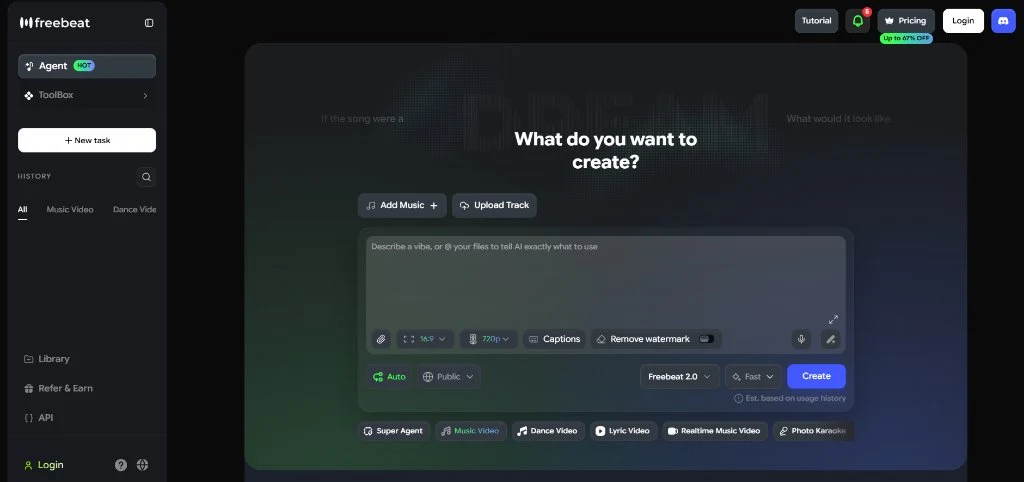
freebeat centres everything around its Freebeat 2.0 Agent workspace. You add or upload a track, type a vibe in the prompt box (or `@` reference files), pick a mode like Music Video, Dance Video, Lyric Video, or Photo Karaoke, and hit Create. It feels like chatting with a director: fast to kick off, minimal sliders, and minimal friction. Notice the defaults inside the workspace, though: 720p resolution and Public visibility are switched on out of the box, with a separate toggle to remove the watermark.
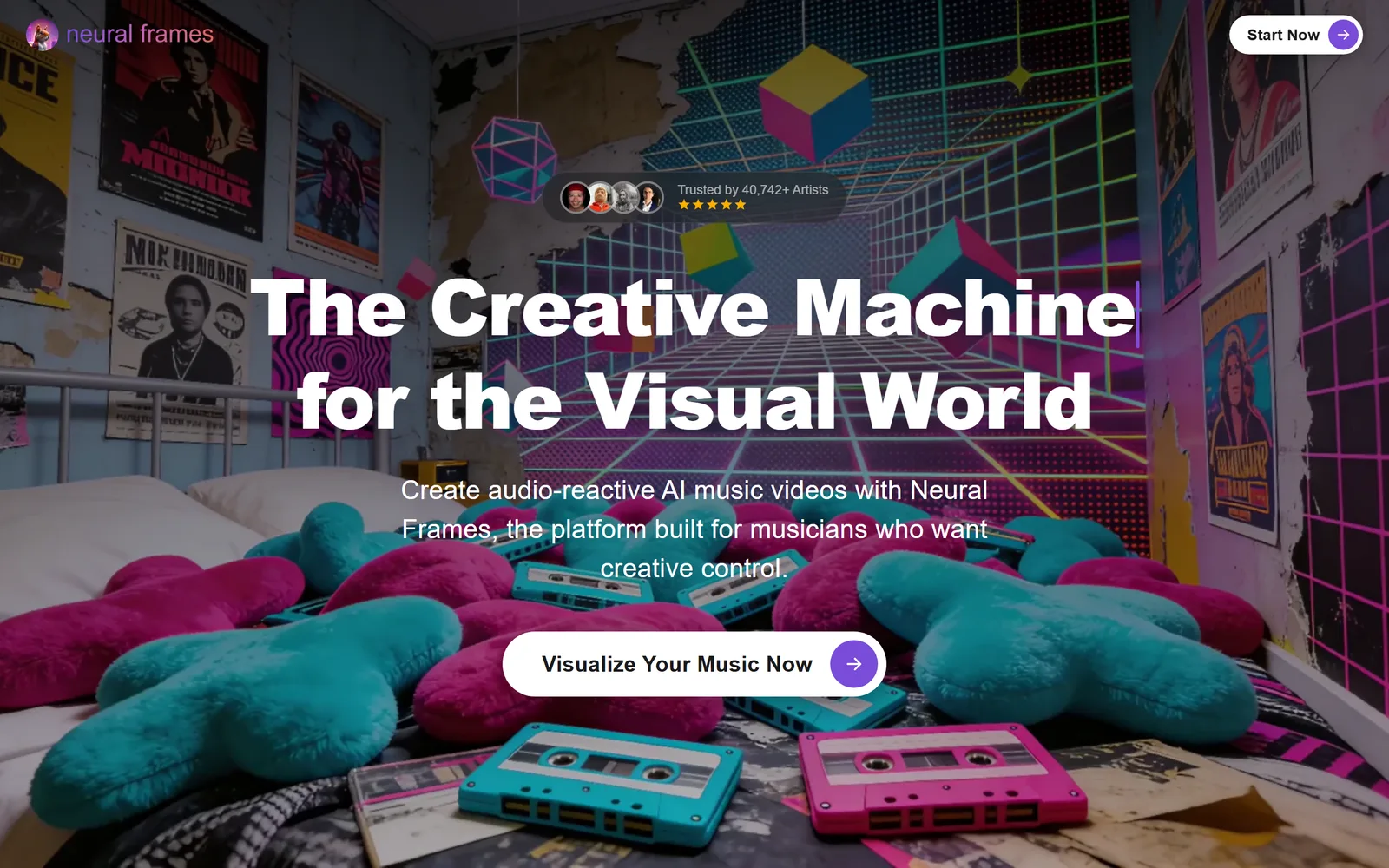
Neural Frames gives you four distinct modes in one subscription: Autopilot (which analyses lyrics, tempo, and key, builds a full storyboard, renders keyframes you approve first, and then generates the video in about 10 to 15 minutes), Short-Form Studio for 9:16 TikToks and Reels, a text-to-video editor, and a frame-by-frame editor where you can wire camera motion, zoom, and colours straight to individual audio stems.
That storyboard checkpoint in Neural Frames is huge. Storyboarding is the cheap step, so you can catch a weird character face or a mismatched scene before you spend video-render credits. On freebeat, because control mostly runs through the prompt and Agent, fixing an off-vibe sequence usually means re-prompting and burning more credits.
Audio sync: eight stems vs beat cuts
Most AI music video tools claim they "sync to the beat". Usually that means the tool detects your BPM and drops scene cuts on bars and choruses. That's roughly what freebeat does: its AI Director maps beats, bars, and song sections, then times shots and dance moves to those hits. It looks lively in short bursts, especially on pop, hip-hop, and EDM hooks.
Neural Frames goes a layer deeper. It separates your track into eight audio stems — kick, snare, bass, vocals, and more — so the actual energy of an instrument can drive the visuals. A kick drum can pulse the camera, a vocal swell can shift the lighting, or a synth build can accelerate the motion. Even when you stay inside Autopilot instead of the frame-by-frame timeline, the pacing feels anchored to your arrangement rather than pasted on top of it.
Lip sync, lyrics & character consistency
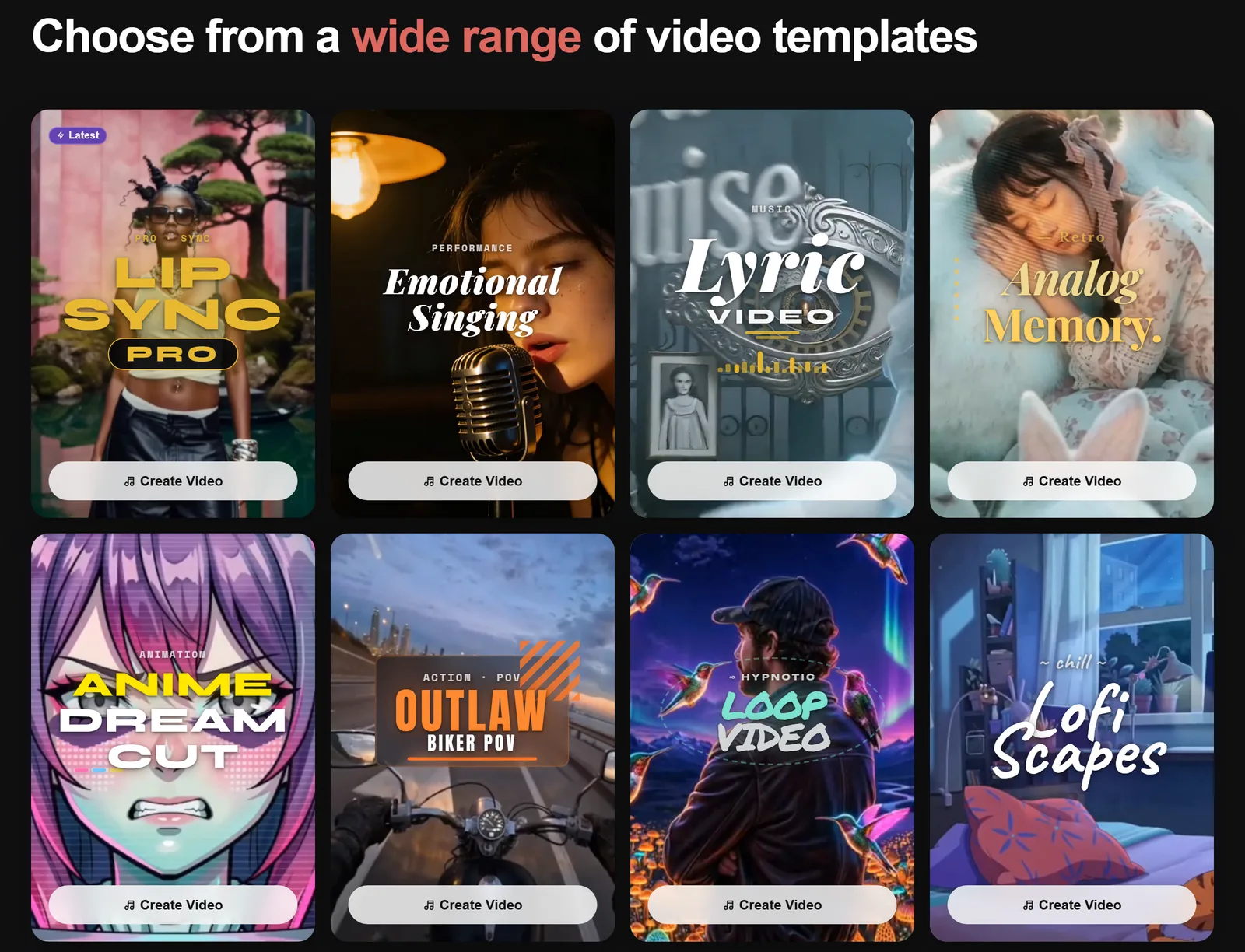
If your whole concept is a singer looking down the lens and performing your song, this is where freebeat earns its reputation. Modes like Photo Karaoke, Dance Video, and Clone Video are built specifically for putting a face or character front and centre with tight mouth movement and on-screen lyrics. For quick promo clips on Reels or TikTok, it's genuinely snappy.
Neural Frames isn't missing lip sync, though — people often assume it only does trippy visualisers. Autopilot has a dedicated Vocal Video mode that lip-syncs a character (described in text or uploaded from a photo) to your track, using Kling 3.0 models for realistic faces. It also builds Lyric Videos with words rendered inside the scene itself (plus a standard caption editor), and lets you lock both consistent characters and consistent Environments across an entire 3-to-10-minute story.
The takeaway: freebeat gets you a singing headshot faster; Neural Frames builds a cohesive, multi-scene music video around that singer without the world morphing into nonsense every five seconds.
Pricing & what a real video costs
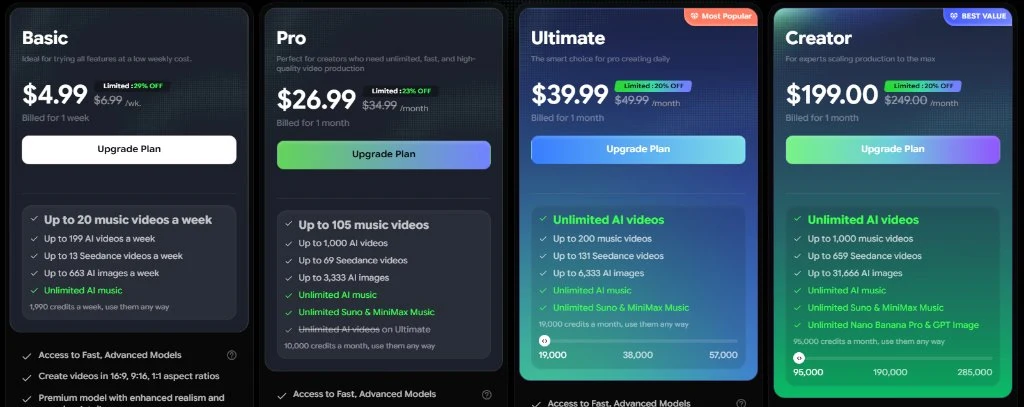
On paper, freebeat looks cheaper because of its entry card: Basic is $6.99 a week (frequently shown with a limited-time promo at $4.99/week) for 1,990 weekly credits. Look closer at the tier ladder, though:
- Basic ($6.99/wk, promo $4.99/wk): 1,990 credits/week, billed every 7 days — which works out to roughly $28–$30/month if you forget to cancel — and capped at 720p.
- Pro ($34.99/mo, promo $26.99/mo): 10,000 credits/month, unlimited AI music (including Suno & MiniMax Music), still capped at 720p.
- Ultimate ($49.99/mo, promo $39.99/mo): 19,000 credits/month, "Unlimited AI videos", and the first tier that unlocks 1080p.
- Creator ($249/mo, promo $199/mo): 95,000 credits/month for heavy studio output.
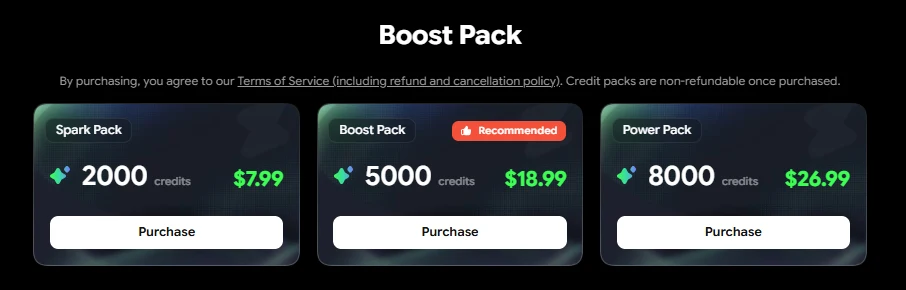
Run out of credits on freebeat and you're pointed at Boost Packs: 2,000 credits for $7.99 (Spark), 5,000 for $18.99 (Boost), or 8,000 for $26.99 (Power) — and the fine print right above the buttons states that credit packs are non-refundable once purchased.
Now compare that with Neural Frames:
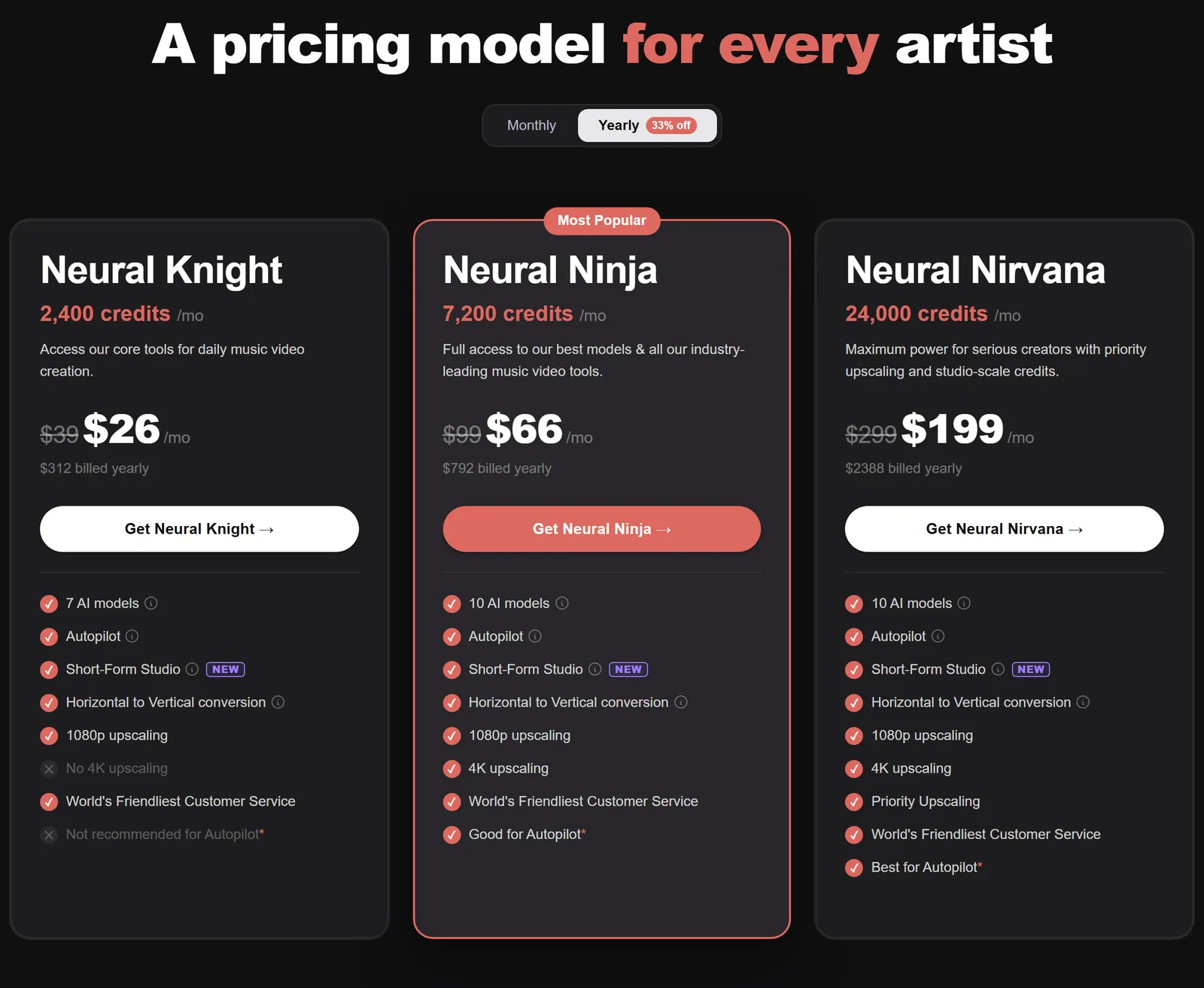
- Neural Knight ($39/mo, or $26/mo billed yearly): 2,400 credits/month, 7 AI models, 1080p export. Best for frame-by-frame visualisers (1 credit/second, so 40 minutes of video). Neural Frames itself notes it's small for full Kling Autopilot videos.
- Neural Ninja ($99/mo, or $66/mo billed yearly): 7,200 credits/month, all 10 AI models (Kling 3.0 Standard & Pro, Seedance 1.5 Pro / 2 / 2.5, MiniMax H3 Max, Gemini Omni Flash), and 4K upscaling.
- Neural Nirvana ($299/mo, or $199/mo billed yearly): 24,000 credits/month, 4K + priority upscaling.
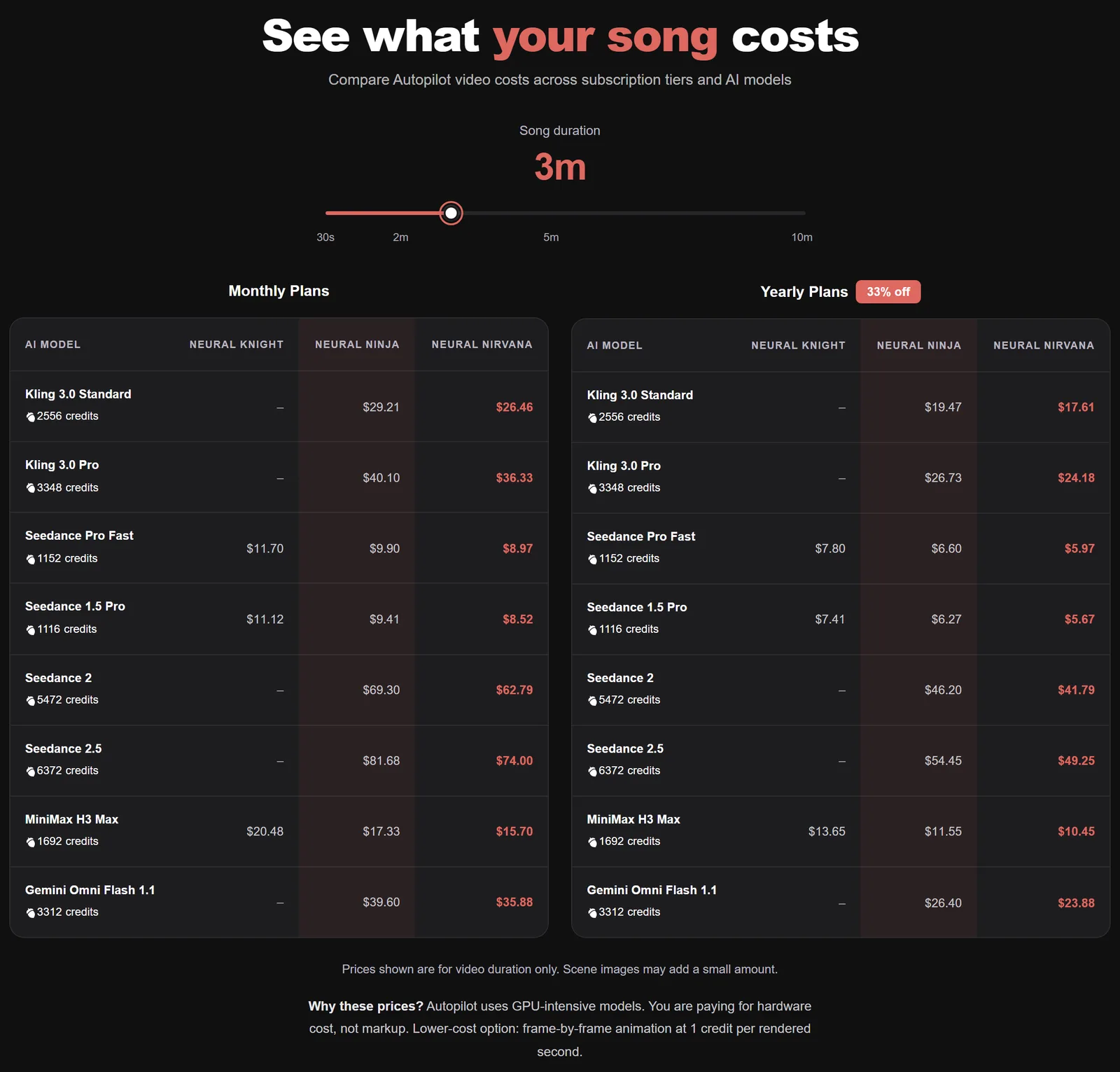
The hidden savings with Neural Frames are in the credit rules. Unused credits roll over up to 3× your monthly allowance, failed generations cost zero credits, and you get one free re-render per minute of video. Using Neural Frames' own calculator, a full 3-minute Autopilot music video costs about $15 to $46 worth of monthly Neural Ninja credits ($10 to $31 billed yearly) depending on whether you render with Seedance 1.5 Pro (1,116 credits) or Kling 3.0 Pro (3,348 credits). My Neural Frames review has the complete cost table for every model.
Test Neural Frames free (no card required) →
720p vs 4K, watermarks & the Suno link catch
Two practical catches trip up a lot of artists picking between these tools:
- Resolution ceilings: If you're uploading an official music video to YouTube, 720p looks soft on laptops and TVs. freebeat keeps Basic and Pro at 720p and makes you pay $49.99/month (regular price) on Ultimate for 1080p. Neural Frames gives you 1080p from its cheapest paid tier ($26/mo yearly) and goes all the way to 4K on Neural Ninja.
- The Suno link catch: freebeat's marquee convenience feature is pasting a Suno, Udio, or SoundCloud URL straight into the homepage. That's fine for personal experiments, but Suno's terms only grant commercial rights to songs you created on a paid Suno plan and downloaded through Suno. If you plan to monetise on YouTube, you should download the WAV or MP3 from Suno and upload the file anyway — which removes freebeat's main shortcut advantage. Read my Suno music video guide for the full breakdown.
What real users say on Trustpilot
Pricing tables only tell half the story. Before putting your card into any credit-based AI app, it's worth checking how they treat paying customers when a render goes sideways.
- Neural Frames holds a 4.0 / 5 ("Great") TrustScore across 94 Trustpilot reviews, with 67% five-star ratings. Users regularly single out the responsive Berlin support team and steady feature updates; the main complaint is simply that top-tier models like Kling and Seedance 2.5 use credits quickly.
- freebeat sits at a 1.5 / 5 ("Bad") TrustScore across more than 300 Trustpilot reviews. The same three complaints come up over and over: credits disappearing rapidly on glitched or stuck generations, unexpected recurring charges (especially around the weekly Basic tier), and slow or unresponsive support when asking for refunds.
I dig deeper into those reviews — plus how to cancel cleanly if you're already subscribed — in my freebeat AI review.
What about Neural Frames vs freebeat vs Kaiber?
A lot of musicians weigh Kaiber alongside these two. Kaiber isn't trying to out-control Neural Frames or out-lip-sync freebeat — its sweet spot is Beat Sync, which turns one song and a few reference images into batches of beat-matched social clips with almost zero prompting.
| Neural Frames | freebeat | Kaiber |
|---|
| Best strength | Eight-stem sync, 4K, full-song storyboarding | One-click lip sync & link paste | Batches of beat-synced social clips |
| Starting paid plan | $39/mo ($26 yearly) | $6.99/wk (Ultimate $49.99/mo for 1080p) | $10/mo ($29 Creator for Beat Sync & rights) |
| Full-length videos | Up to 10 minutes | Yes | 1 to 3 minutes (Montage) |
| Unused credits | Roll over (up to 3×) | Reset each billing cycle | Roll over |
| Pick it if... | You want a proper YouTube music video | You want quick singer-to-camera clips | You want 10 TikTok teasers per song |
Just remember that Kaiber's $10 Starter plan doesn't include Beat Sync or commercial rights, so you really want Creator at $29/month ($23 yearly). If you're shopping wider, check my roundup of the best freebeat alternatives or the full AI music video generator rankings.
Which one should you pick?
Here's the short decision guide I'd use with my own tracks:
| If... | Pick |
|---|
| You want visuals that genuinely move with the drums, bass, and vocals | Neural Frames |
| You care about 1080p or 4K exports for YouTube | Neural Frames |
| You want credits that roll over and no charge for failed renders | Neural Frames |
| You want to edit a storyboard, lock environments, or use frame-by-frame mode | Neural Frames |
| You want to paste a SoundCloud or Suno link for a fast lip-sync or Photo Karaoke test | freebeat |
| You want a quick AI dance video without touching a timeline | freebeat |
| You want a stack of short beat-synced promo clips for Reels and TikTok | Kaiber |
If you want a music video you're actually proud to drop on YouTube — in sharp 1080p or 4K, synced to your drums and vocals, with credits that don't vanish at the end of the month — start free on Neural Frames. You don't even need a credit card to upload a track and test the editor first.
Start your first video on Neural Frames free →